


How Do Electronic Price Tags Work? ESL Technology Explained
Electronic price labels are small digital screens attached to store shelves to display product prices, names, and promotions. Also called electronic shelf labels (ESLs) or digital price tags, they replace paper labels and let retailers update product information electronically.
Electronic price tags work by receiving price updates wirelessly from a store’s management software. The software connects each product to the correct shelf label, sends the new information, and tracks the update. Staff can change prices without replacing paper labels by hand.
- 01Change the priceIn the store’s software
- 02Send the updateThrough a wireless gateway
- 03Refresh the labelAt the correct product
- 04Check the resultIn the management software
This is the usual setup for a networked ESL system. Some labels instead receive updates from a nearby phone or handheld reader. The difference matters when choosing between occasional updates and remote control of a whole store.
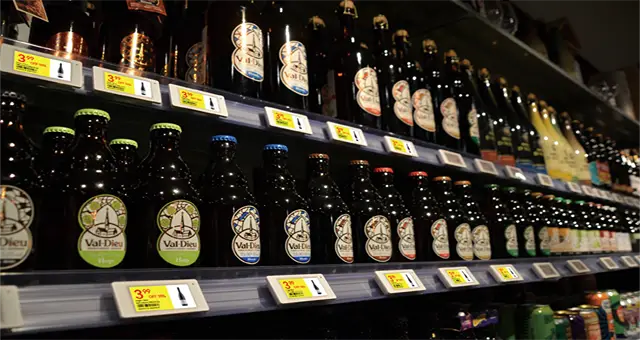
How Does a Price Change Reach the Shelf?
Imagine that a store reduces the price of milk from $3.99 to $3.49. In a typical connected system, the update follows these steps:
- A staff member changes the price. The new price is entered in the system the retailer uses to manage pricing. This may be its point-of-sale (POS) system, which handles checkout sales, or a separate pricing platform.
- The ESL software finds the matching label. During setup, staff link each shelf label to a product. The software uses that link to send the milk price to the milk label.
- A gateway sends the update wirelessly. A gateway is a device that passes information between the store’s software and its shelf labels. It is often installed on a ceiling or wall.
- The label displays the new price. Its small built-in controller receives the update and refreshes the screen to show $3.49.
- The software checks the response. In systems with two-way communication, the label sends a status response. Missing or failed updates can then be retried or flagged for staff to investigate.
The same process can update one label or a selected group, such as all the products in a promotion. Staff manage the change in software instead of walking to each shelf with a replacement paper tag.
What Does an Electronic Shelf Label System Need?
A typical networked system has three main parts. Each has a different job.
1. Management software organizes the information
The software manages product names, prices, promotions, and label layouts. It connects to the retailer’s POS or enterprise resource planning (ERP) system, which manages business records such as products and inventory. An integration lets those systems share data instead of requiring staff to enter every price twice.
The software may run on a local server or through a cloud service. Compatibility with the store’s existing systems needs to be checked before installation.
2. Gateways deliver the updates
Gateways, also called access points or base stations, provide the wireless connection to the labels. Their number and placement depend on the store layout, shelving, radio coverage, and update workload. A product count alone does not tell you how many gateways a store needs.
3. Shelf labels show the result
Each electronic price label contains a display and control electronics. A wireless model also has a radio and usually a battery. Labels can show a price, product name, unit price, barcode, or promotion, depending on the screen and template. Rails, clips, or brackets hold them in the correct shelf position.
A closer look: how does the system identify the right label?
A product has a stock keeping unit (SKU), the retailer’s code for that product. A label has its own device ID. Staff typically scan the product and label to link those two records. One product can be linked to several labels if it appears in several places.
The software uses this mapping to select the intended labels. If a product moves, staff must update the mapping as needed. The label does not identify the item beside it by looking at the shelf.
Why Do Digital Price Tags Look Like Paper?
Many digital shelf labels use e-paper, the same broad display technology found in e-readers. The screen reflects surrounding light, so text can look more like print than a glowing phone screen.

The key feature is that the display keeps its image after the power used to change it is removed. Retailer Migros describes this behavior in its own stores: the displayed information remains visible even if the battery is flat or the signal fails. [1]
A visible price is not proof of a working connection. An e-paper tag can still show an old price while it is unable to receive a new one. Staff need the update status as well as the display.
Do electronic price tags need batteries?
Most wireless ESLs do. Although the e-paper image needs no continuous display power, the radio and control electronics still use energy. Battery life depends on the model, update frequency, temperature, signal conditions, and features such as flashing LEDs.
Check the conditions behind a supplier’s battery-life rating: how often was the label updated, at what temperature, and with which features enabled? Some NFC-powered labels can work without a battery, but they need a compatible reader held close to them for an update.
How Do Electronic Shelf Labels Receive Wireless Updates?
A wireless protocol is simply the set of rules devices use to communicate. Labels and gateways must support compatible rules; sharing a frequency does not automatically make products work together.
| Connection | How it works | What to check |
|---|---|---|
| 2.4 GHz proprietary radio | Compatible gateways send data to labels using the supplier’s radio protocol. | Gateway compatibility, store coverage, and performance during bulk updates. |
| 433 MHz radio | A compatible system uses a lower radio frequency to communicate with labels. | Availability for the installation region and coverage in the actual store. |
| Bluetooth Low Energy (BLE) | Labels communicate with compatible Bluetooth hardware; the setup varies by product. | Whether it uses phone-based updates or a managed gateway system, and which ESL features it supports. |
| Near Field Communication (NFC) | A compatible phone or reader communicates with a label held close to it. | Reader and app compatibility, power requirements, and time spent visiting each label. |
How do Bluetooth electronic shelf labels work?
BLE is a low-power form of Bluetooth. Some products let staff update labels from a phone; others use access points to manage many labels remotely. Bluetooth SIG’s ESL standard supports communication between an access point and large groups of labels, including responses from those labels. Bluetooth is therefore not limited to small stores. [2]
A closer look: what does Bluetooth 5.4 change?
Bluetooth 5.4 introduced Periodic Advertising with Responses (PAwR). In plain language, an access point sends messages on a schedule and gives labels allocated opportunities to reply. This lets many low-power devices communicate in an organized way. [2]
Do not assume that an older BLE label, a phone app, and a Bluetooth ESL access point are interchangeable. Check the supported features and the supplier’s compatibility documentation.
How do NFC price tags work?
For an NFC-updated label, staff bring a compatible reader close to transfer the new information. NFC can transfer power as well as data, enabling batteryless designs. The NFC Forum explains this power-transfer capability in its technical overview. [3]
The trade-off is the need to visit each label. Also, an NFC feature does not always mean the tag is batteryless: a wireless ESL may use NFC only for setup or product linking.
Do electronic shelf labels use the store’s Wi-Fi?
Not necessarily. There are two separate connections: software to gateway, and gateway to label. A gateway may use Ethernet or Wi-Fi to reach the store network while using a different radio protocol to reach the labels. Check both connections when reviewing an ESL Wi-Fi solution; an ordinary Wi-Fi router alone may not support the labels.
What Changes for Store Staff?
Once products and labels are correctly linked, staff can handle routine price changes from software. A scheduled promotion can update the relevant labels without a separate round of printing and replacing paper tags.
The practical benefits include less manual relabeling, more consistent product information, and easier promotion changes. Staff still need to handle product moves, damaged tags, battery replacement where applicable, and failed updates.
Labels can also display inventory information supplied by another system. A standard price label does not count stock by itself. Automatic stock detection requires additional data or equipment.
Common Questions About Electronic Price Tags
How quickly do digital price tags update?
There is no single speed for every system. Total time includes transferring the price from the store software, delivering it wirelessly, and refreshing the display. Ask for a demonstration of both one-label and full-store updates under conditions similar to your own.
What happens if the internet goes down?
E-paper labels normally retain their last displayed information. Whether new updates can continue depends on the setup: cloud-dependent updates may stop, while a locally managed system may keep working if its server and wireless network remain available. Check the offline behavior before rollout.
Will the shelf price always match the checkout price?
Using a shared price source reduces mismatches, but a delayed update, failed connection, or incorrect product link can still cause an error. Reliable operation needs coordinated pricing data, update monitoring, and a process for resolving exceptions.
Do electronic price tags decide when prices change?
No. The retailer’s staff or pricing software makes that decision. A label displays the information it receives. The ability to update prices remotely does not, by itself, mean a store uses demand-based pricing.
Do digital price tags have cameras?
A camera is not needed to receive or display a price update. Walmart, for example, states that its digital shelf labels have no cameras or microphones and do not track customers. That describes Walmart’s installation; check the specific retailer’s disclosures rather than assuming every system is identical. [4]
How much do electronic price tags cost?
There is no single price for every label or store. For a useful quote, specify screen size, color options, and quantity. Ask for the total system cost, including any gateways, software fees, installation, and integration with the existing pricing system.
Can the same labels be used in a freezer?
Only if the model is rated for those conditions. Check operating temperature, moisture protection, mounting, and battery performance. The radio frequency alone does not make a label suitable for freezer use.
What Should You Check Before Installing ESLs?
A useful pilot should test the complete process, not just whether a screen changes. Start with a representative store area and confirm:
- Data integration: the existing pricing system can supply accurate product and price information.
- Product linking: staff can link labels correctly and update those links when products move.
- Coverage: updates reach the intended shelves, including difficult locations.
- Exception handling: staff can identify missing updates and follow a clear recovery process.
- Maintenance: batteries, mounts, and environmental ratings suit the store’s daily use.
Upgrade Your Shelf Pricing with Zhsunyco
Ready to spend less time replacing paper price tags? Zhsunyco brings together electronic shelf labels, management software, and technical support to help retailers manage price updates across one store or multiple locations.
As an ESL manufacturer, we offer labels in different sizes, colors, and mounting options. Our team can help assess integration with your existing POS system and provide customization, sample development, and after-sales support for your project.
Tell us your store size, label quantity, and current pricing system. Contact Zhsunyco to discuss a suitable ESL setup and request a quote tailored to your needs.
Get Your ESL Solution QuoteReferences
- Migros: Why is Migros now displaying prices only electronically?Retailer interview, December 2, 2022. Explains product linking and how e-paper retains displayed information.
- Bluetooth SIG: Bluetooth ESL, the global standard for the electronic shelf label marketIndustry standards organization, February 8, 2023. Explains ESL access points, two-way communication, and PAwR.
- NFC Forum: NFC Technology Technical OverviewIndustry standards organization. Explains close-range communication and power transfer for batteryless operation.
- Walmart: Digital Shelf Labels, A Modern Tool for Every Day Low PricingRetailer explanation. Describes Walmart’s own labels and states that they have no cameras or microphones.

 English
  Russian
  Spanish
  German
  Arabic
  French
  Bulgarian
  Polish
  Romanian
  Turkish
  Portuguese