


A price changes in your retail system. How does the right shelf label receive it, display it, and report whether the update succeeded? That journey is the best starting point for understanding electronic shelf label technology.
Behind the screen sits a connected system of displays, wireless communication, and management software. This guide explains how those parts work together, where the technical trade-offs matter, and what to test before committing to a rollout.
What Is Electronic Shelf Label Technology?
Electronic shelf label technology combines electronically controlled displays with a communication link and software to update product information at the shelf edge. An electronic shelf label, or ESL, is the individual device; an electronic shelf label system also includes the infrastructure and management tools that keep those devices connected to retail data.
A typical networked installation has three layers: the labels, gateways or access points, and an ESL management platform connected to a POS, ERP, or other approved price source. Labels contain a display, controller, communication circuitry, and a power source. Some close-range NFC designs use a different update path and may harvest energy from a reader instead of relying on a battery.
The main job is to present the correct price and product details without replacing paper tags. Optional features, such as LED picking guidance or inventory information on the screen, depend on the selected hardware and software integration. An ESL does not independently count stock or decide what a product should cost.
How Do Electronic Shelf Labels Work?
In a centrally managed installation, a price update passes through several steps. Understanding each handoff helps explain both the convenience of ESLs and the checks needed to keep shelf and checkout prices aligned.
From Product Data to the Correct Label
First, the retailer identifies the authoritative source for prices, promotions, product names, and unit information. Staff bind each physical label ID to the correct SKU and store location, often by scanning the product and label. The platform then places the approved data into a display template and queues the update for its destination.
This binding matters as much as radio performance. A label can receive an update perfectly and still show the wrong product if the SKU mapping is incorrect. Moving products, adding a second display location, or replacing a damaged tag should therefore include a binding check.
From Wireless Delivery to Display Confirmation
The gateway delivers the update using the system’s communication method. The label controller processes the data and drives the screen. In systems supporting feedback, the platform receives status information and can retry failed updates or alert staff.
Ask what an “update complete” status actually confirms: message delivery, stored image data, or completion of the display refresh. A transmission acknowledgement is not automatically proof of a readable, correct shelf price. Pilot testing should include a physical check against the checkout price.
End-to-end time includes data export or API processing, queueing, wireless delivery, retries, and screen refresh. Test a realistic promotion batch under store conditions instead of treating a single-label demonstration as a full-store speed guarantee.
Display Technology: E-Paper and LCD
Electronic shelf label types can be grouped by display technology or by communication method. Keep these categories separate: an e-paper display describes how the image is produced, while Bluetooth or a proprietary radio describes how updates arrive.
Why E-Paper Holds an Image Without Continuous Power
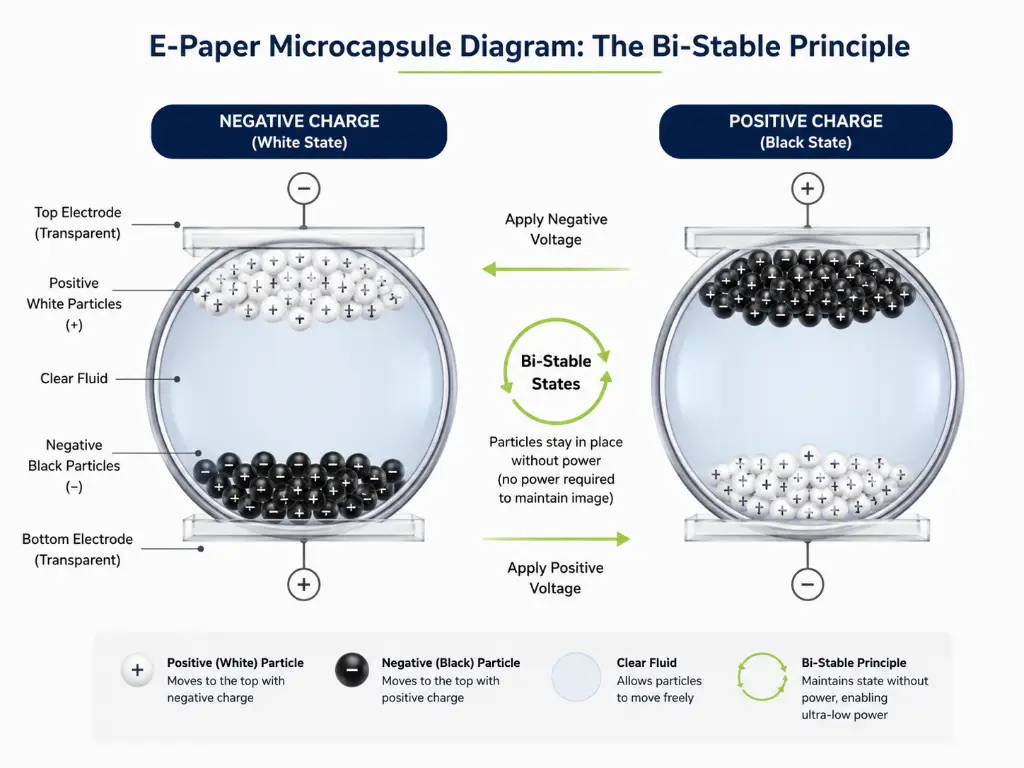
Electrophoretic e-paper uses an electric field to move charged pigment particles and form text or graphics. The material retains its visible state after the driving voltage is removed. This property, called bistability, means the display does not need continuous power to hold a static price. E Ink explains this distinction in its display technology guide.
The complete ESL still consumes energy. Wireless reception and transmission, controller activity, sleep current, screen updates, and optional LEDs all contribute. E-paper’s image retention supports a low-power design; it does not make the entire tag a zero-power device.
Color, Readability, and Refresh Performance
Black-and-white panels suit clear price and product information. Additional colors can distinguish promotions and other messages, provided the template remains readable. E Ink introduced its four-particle Spectra 3100 platform, with black, white, red, and yellow pigments, in April 2021.
Compare the actual panel and finished label rather than assuming every color display behaves alike. Refresh time depends on the panel, waveform, temperature, and update mode. Reflective e-paper benefits from ambient light, but the enclosure, glare, text size, and shelf angle still affect readability. Outdoor use also requires suitable temperature, weather, and mounting specifications.
| Display option | Useful characteristics | What to check |
|---|---|---|
| E-paper | Static price information; image retention without continuous display power; reflective readability. | Color palette, refresh behavior, temperature range, and legibility in the installed position. |
| Low-power segmented LCD | Simple numerals or predefined symbols in purpose-built label designs. | Content flexibility, viewing characteristics, and measured device power consumption. |
| Full-color backlit LCD | Rich graphics and motion where a suitable power supply is available. | Power provision, brightness, heat, glare, and the physical installation. |
Do not treat all LCD products as identical. A small segmented label and a backlit advertising screen serve different purposes. For motion-led promotions, LCD retail displays may complement e-paper price labels instead of replacing every label in the store.
Wireless Communication Technologies Compared
There is no reliable “small store equals BLE, large store equals 433MHz” rule. Coverage and capacity depend on the complete implementation: antennas, access-point placement, tag scheduling, interference, shelving, and the update workload.
Frequency and protocol are also different concepts. Bluetooth LE operates in the 2.4GHz band, as do proprietary ESL radios and some Wi-Fi networks. In the table below, “proprietary 2.4GHz RF” means a vendor-specific communication implementation, not all technologies using that frequency band.
| Communication option | How it fits an ESL system | Evaluation priority |
|---|---|---|
| Proprietary 2.4GHz RF | Dedicated labels and gateways using the supplier’s wireless implementation. | Coexistence with other networks, batch completion time, retries, and supported tag/gateway combinations. |
| Sub-GHz RF, including 433MHz implementations | An alternative frequency range for purpose-built ESL networks. | Site coverage, available capacity, and suitability of the exact radio model for the deployment country. |
| Bluetooth Low Energy | May use vendor-specific behavior or the standardized Bluetooth ESL approach. | Which profile and features are implemented; interoperability evidence and performance at the intended scale. |
| NFC | A close-range link; it may support updates, commissioning, or energy harvesting, depending on the product. | Whether routine updates require approaching each label, and whether the label actually supports batteryless operation. |
| Wi-Fi-connected solutions | Wi-Fi may connect a gateway to the network, or connect the label itself in a direct-Wi-Fi design. | Where Wi-Fi is used, the label’s power budget, access-point capacity, and IT requirements. |
| Optical wireless / infrared | Dedicated optical infrastructure communicates with compatible labels using an infrared link. | Coverage with the actual fixtures, infrastructure placement, and supported system components. |
Include optical wireless in the evaluation when comparing communication architectures. As with radio-based options, assess the complete system’s coverage, update performance, and installation requirements.
What the Bluetooth ESL Standard Changes
The Electronic Shelf Label Profile is a separate specification that uses features in Bluetooth Core 5.4. One of those features, Periodic Advertising with Responses (PAwR), enables scheduled two-way exchanges with many low-power devices. This makes a blanket restriction of BLE to small stores inappropriate. See the Bluetooth SIG ESL standard overview and Core 5.4 feature explanation.
However, “Bluetooth 5.4” on a specification sheet is not enough to establish interoperability. Ask which ESL profile and service versions are implemented, what qualification documentation is available, and which combinations of labels, access points, and management software have been tested together.
It is “Can this complete system update our labels reliably in our store?” Include dense shelving, freezer doors, busy trading periods, and the largest planned promotion batch in the coverage and capacity test.
Integration, Reliability, and Maintenance
Connect the Price Source, Not Just the Network
The ESL management platform handles templates, product-to-label mapping, update queues, scheduling, and status monitoring. Depending on the product, it may also provide permissions and multi-store controls. Before integration begins, agree which system owns each field and how store-specific prices and promotion start/end times will be handled.
API integration can transfer changes frequently; middleware can coordinate messages between different systems; scheduled file exchange can be sufficient for less frequent changes. Each approach needs field validation, error reporting, retry handling, and protection against older data overwriting a newer price.
An API or MQTT interface is useful only when its documentation and behavior meet the integration requirements. Neither guarantees that another vendor’s labels will work with the gateway. Evaluate business-system integration, data export, and label-level interoperability as separate questions.
What Happens When a Gateway or Internet Connection Fails?
An e-paper label normally retains its last displayed image if its gateway becomes unavailable. That is different from continuing to receive current prices. A readable tag can still contain stale information, so disconnection should be visible to the staff responsible for price accuracy.
Cloud, on-premise, and hybrid systems differ in their failure behavior. Local operation or queued updates during an internet outage must be explicitly supported; do not assume a gateway can do this merely because it remains powered. Test loss of internet access and loss of a gateway separately, including the order in which pending changes are applied after recovery.
Battery Life: Request the Test Conditions
Battery-life estimates are meaningful only with the model, battery configuration, temperature, display update frequency, and wireless activity stated. LEDs, retries, and controller sleep current can also affect endurance. Ask for a power budget that accounts for the complete device, including communication and optional features, rather than the screen alone.
Ask whether batteries are replaceable, how low-battery alerts work, and what staff must do after a replacement. Product warranty, expected battery life, and total hardware service life are different commitments. Budget for inspection, damaged tags, mounting parts, and any planned battery replacement rather than describing ESLs as maintenance-free.
Match the Whole Label to the Environment
Check the finished product’s operating and storage temperatures, display refresh limits, sealing, and resistance to the cleaning conditions it will encounter. Ingress protection and low-temperature performance are separate properties: a water-resistant enclosure alone does not make its screen or battery freezer-rated.
Test the intended model in the actual chilled, frozen, humid, or sunlit location. Include condensation and door-opening cycles where relevant, and check that the price remains readable from the shopper’s normal position.

| Mount | Useful application | Check before ordering |
|---|---|---|
| Rail-mounted | Repeated shelf-edge installations. | Rail profile, label adapter, retention, and replacement access. |
| Bracket or clip | Retrofitting shelves, hooks, or display fixtures. | Fixture dimensions, viewing angle, and resistance to repeated handling. |
| Magnetic | Repositionable mounting on suitable steel surfaces. | Surface compatibility, holding force, and protection against accidental removal. |
| Adhesive | Surfaces where compatible rails or clips are impractical. | Surface preparation, temperature, cleaning exposure, and removal requirements. |
Security and Ownership
Request evidence for authenticated administration, appropriate permissions, protected communications, device provisioning, and a supported firmware-update process. Also agree who can approve price changes, how actions are logged, and who responds to security issues. Security requires operational controls as well as suitable hardware.
For cloud systems, clarify data location, backup and recovery responsibilities, account access, and export options. For local systems, clarify patching and server maintenance. Neither hosting model is automatically secure or independent of outside services.
How to Evaluate an ESL System Before Rollout
Start with a representative pilot, not a universal store-size formula. Count the physical label positions, including secondary displays; SKU count alone may understate the number of tags needed. Agree acceptance criteria with operations and IT before comparing proposals.
- Update performance: record batch size, completion time, failed updates, retries, and the meaning of each status.
- Price accuracy: compare shelf and checkout prices during promotion starts, expiries, product moves, and label replacements.
- Environment and recovery: test challenging locations, gateway failure, internet loss, and recovery from stale data.
- Staff workflow: observe binding, template changes, battery or tag replacement, and exception handling.
- Support and expansion: obtain written licensing, capacity, spare-parts, warranty, delivery, and maintenance terms.
Quality evidence should relate to the exact product and production scope. If a supplier quotes a defect rate, ask for its definition, sample size, period, and whether it measures outgoing inspection or field returns. Request relevant product documentation rather than treating a particular store count or inspection-step count as a universal quality threshold.
A Transparent Cost and Payback Example
Compare the total cost of electronic shelf labels, not only the unit price. Include tags, gateways, mounts, integration, installation, training, software, and support. Subscription and perpetual-license models can both be workable; compare their costs and obligations over the same period.
Illustrative planning example only: The figures below are hypothetical assumptions for one store, not market averages, a Zhsunyco quote, or a customer result. All amounts are in EUR. The model uses 52 weeks per year and an assumed fully loaded labor cost of €18/hour.
| Annual cost | Paper-label baseline | ESL scenario |
|---|---|---|
| Price-label work | 40 h/week × €18 × 52 €37,440 | 8 h/week × €18 × 52 €7,488 |
| Printing and consumables | €3,000 | €500 for residual printing |
| Incremental software and support | €0 | €3,600 |
| Electricity, spares, and maintenance allowance | Included in the baseline above | €2,000 |
| Annual modeled operating cost | €40,440 | €13,588 |
With an assumed upfront project cost of €80,000 covering hardware, mounts, integration, installation, and training, the annual modeled benefit is €40,440 − €13,588 = €26,852. Simple payback is €80,000 ÷ €26,852, or approximately 3.0 years, only if the modeled labor value is fully realizable.
Over five years, under unchanged assumptions, the paper baseline is €202,200 and the ESL scenario is €147,940, including the upfront investment once. This simplified comparison excludes tax, financing, discounting, inflation, residual value, major hardware replacement, and any unverified sales or pricing-error benefits.
This example releases 32 staff-hours per week. If payroll does not fall, that is operating capacity, not a matching cash saving. With no realizable labor saving, the assumed €2,500 printing saving is smaller than the €5,600 added annual software and maintenance costs; this model would not deliver cash payback. Keep productivity value and cash ROI separate.
Emerging Capabilities: Keep the System Boundaries Clear
Electronic shelf label technology can support more than pricing, but additional outcomes depend on additional components. When assessing an emerging feature, ask what is built into the tag, what software is required, and what external data or sensors it relies on.
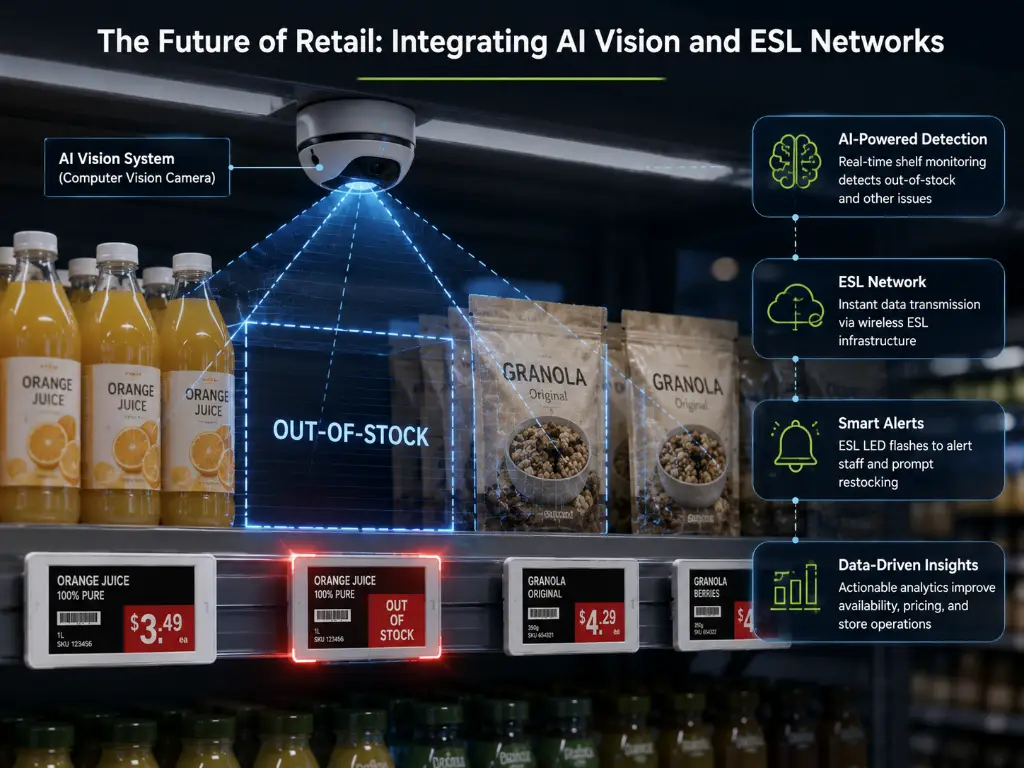
Connected shelf workflows: A system can use inventory or camera-derived information to trigger a compatible label’s LED or display a replenishment message. The detection comes from those connected systems; a conventional ESL does not independently recognize an empty shelf, identify a shopper’s purchase, or detect theft.
Batteryless designs: Energy harvesting changes the power architecture, not the need for an update path. Close-range NFC-powered designs and other energy-harvesting approaches have different infrastructure and update constraints. Request a working demonstration of power delivery, update distance, and supported content before assuming batteryless means unattended full-store updating.
Interoperability and lifecycle planning: Standardized interfaces, supported firmware, replaceable parts, and clear data-export arrangements deserve attention alongside new display features. For sustainability claims, compare the actual service life, batteries, replacement rate, electricity, and avoided printing under stated assumptions rather than applying a single headline carbon figure to every store.
Frequently Asked Questions
Do electronic shelf labels use Wi-Fi?
Some do, but “Wi-Fi ESL” can describe either a directly connected label or a gateway using Wi-Fi for its network connection. Many labels communicate through another radio or optical link. Ask for a diagram showing the connection at each layer.
What types of electronic shelf labels are available?
Compare display types first: e-paper, segmented LCD, and richer LCD display formats serve different content needs. Then compare communication and power: proprietary RF, Bluetooth, optical wireless, or NFC, with batteries, external power, or energy harvesting depending on the model.
What is the lifespan and maintenance requirement of an ESL?
Battery life, display life, and warranty are not interchangeable. Ask for the model’s tested operating conditions, battery replacement procedure, spare-part availability, and support period. Routine work includes checking failed updates, damaged or misplaced tags, low-battery alerts, and product-to-label bindings.
Will labels go blank during an outage?
E-paper normally keeps its last image, but it may stop receiving new prices. Test whether the system flags disconnected labels, retries updates, and restores the correct current price after recovery. A powered LCD product can behave differently.
Can an ESL system work with an existing POS or ERP?
It may connect through an API, middleware, or file exchange, depending on both systems. Confirm supported fields, update timing, error handling, and integration responsibilities in a pilot. “API available” alone does not establish compatibility.
Can electronic shelf labels track inventory automatically?
They can display inventory data or guide picking when the chosen solution supports those integrations. The inventory records or physical stock detection must come from the relevant business system or sensing equipment; the price display alone does not count products.
The right electronic shelf label technology is the combination that keeps your price data, store environment, and staff workflow aligned. A clear update path, measurable pilot results, and a realistic lifecycle budget provide a stronger basis for selection than a headline range, battery-life claim, or promised payback period.
Find the Right ESL Hardware for Your Store
Share your label count, display sizes, shelf conditions, and POS or ERP platform. We will help you review suitable Zhsunyco products and clarify the requirements for a pilot.
Discuss Your ESL ProjectReferences
- E Ink. “Display Benefits: Bistability and Reflective Operation.” n.d. eink.com
- E Ink. “Introducing E Ink Spectra 3100: A New Way to See Color.” 2021. blog.eink.com
- Bluetooth SIG. “Bluetooth Electronic Shelf Labels (ESL).” n.d. bluetooth.com
- Bluetooth SIG. “Bluetooth Core 5.4 Feature Overview.” 2023. bluetooth.com

 English
  Russian
  Spanish
  German
  Arabic
  French
  Bulgarian
  Polish
  Romanian
  Turkish
  Portuguese