


What Is a Digital Price Tag? A Retailer’s Guide to Electronic Shelf Labels (ESL)
01What Is a Digital Price Tag?
A digital price tag is a small, battery-powered display mounted on retail shelf edges. It shows product prices and product information — and it updates wirelessly from a central computer in seconds. When a price changes, staff update the number in software. Every tag on the shelf changes automatically. No printing, no sorting, no walking the aisles with a label gun.
Physically, these tags are compact — typically between 2.1 and 7.5 inches diagonally — and attach to standard shelf rails using clips, hooks, or adhesive mounts. From a few feet away, they look like high-contrast printed labels. Up close, you can see the electronic paper surface: a matte, glare-free screen that reads like ink on paper, even under bright supermarket lighting.
The industry calls them Electronic Shelf Labels, or ESL for short. If you search for “digital price tag” and land on a manufacturer’s website, you will see “ESL” everywhere — it is the same thing. “Digital price tag” is what consumers and retail newcomers type into Google. “ESL” is what the industry uses once you are past the first conversation.
Think of it this way: if you have ever seen a Kindle e-reader, you have already seen the screen technology that powers most digital price tags. Now imagine thousands of those tiny Kindle screens, each one mounted beneath a different product on a supermarket aisle, all updating their prices at once from a single click in the back office. That is what a digital price tag system does.
02How Digital Price Tags Work
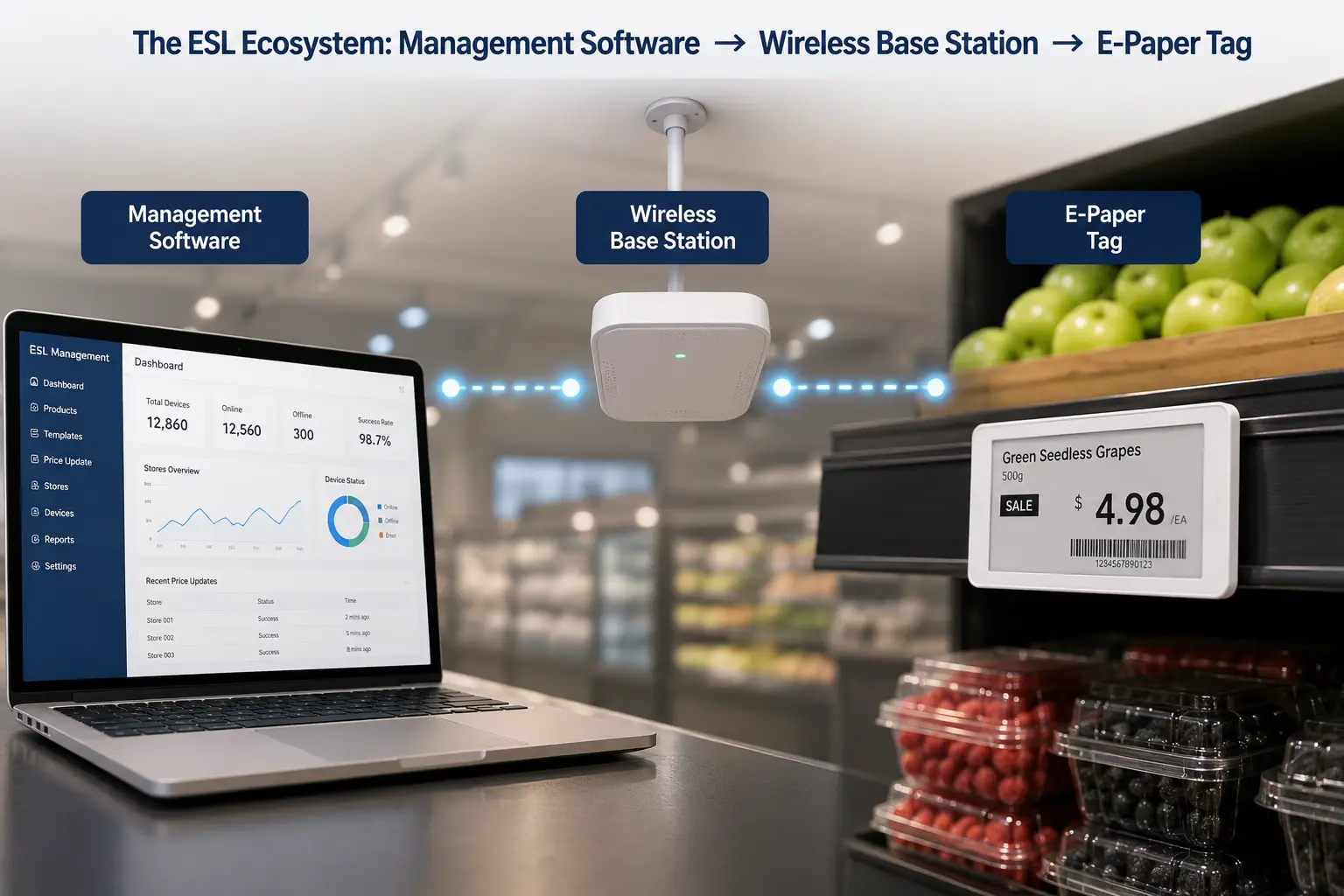
Before we get into benefits or costs, it helps to understand how the system actually functions. A digital price tag is not a standalone gadget — it is one piece of a three-part connected system. Knowing the basic architecture helps you evaluate vendors and avoid misunderstandings later.
The Three Parts of an ESL System
Every digital price tag deployment — from a single convenience store to a chain of 200 hypermarkets — has the same three components.
The management software is where the human work happens. Store staff log into a desktop or cloud application, select products, update prices, design label templates, and schedule promotions. This software typically integrates with the store’s existing POS or ERP system. When a price changes in the central database, the shelf label updates automatically. No double-entry. No “we changed the system but forgot the shelves.”
The wireless base station — sometimes called an access point or gateway — bridges the software and the physical tags. It connects to the store’s local network (via Ethernet or Wi-Fi) and broadcasts updates to every tag within its coverage radius. A single base station typically covers 15 to 30 meters indoors and can manage anywhere from 5,000 to over 10,000 individual tags, depending on the model and store layout.
The ESL tags themselves are the endpoints. Each tag has a unique ID, so the system knows exactly which SKU sits behind which tag. When a price update arrives, only that specific tag refreshes. The rest stay unchanged. This is not a “broadcast to everyone and hope for the best” system — it is addressed, precise, and traceable.
E-Paper Display Technology
The reason a digital price tag can run for five years on a single coin-cell battery is the display technology: electronic paper, or e-paper.
E-paper works differently from a phone or TV screen. Instead of emitting light, it reflects ambient light — exactly like ink on paper. Inside each pixel, microscopic capsules containing charged pigment particles float in a clear fluid. Apply a tiny electric field, and the particles rearrange to form text or an image. Once the image is set, it stays there without any power at all. This is called bi-stable or multi-stable technology — the screen only uses electricity during the fraction of a second when the display changes.
What this means in practical terms: a tag can refresh its screen over 100,000 times across a 5-to-10-year lifespan on one battery. The display is readable from nearly any angle (close to 180 degrees), remains crisp under direct sunlight, and produces zero blue light or flicker. For a shelf edge that sits under fluorescent tubes 12 hours a day, this is the ideal screen technology.
Compare this to an LCD phone screen, which must constantly refresh its image — burning power every second — and washes out under bright light. Your phone battery dies in a day. An ESL tag battery lasts half a decade. They are fundamentally different display technologies.
How Wireless Updates Reach the Shelf
The final piece of the puzzle is communication: how does a price change typed into a computer in the back office end up on a tag 50 meters away in aisle 7?
ESL systems do not rely on the store’s customer Wi-Fi. They use dedicated low-power wireless protocols designed specifically for shelf-edge communication — protocols that prioritize reliability and battery life over speed.
The most common protocol for larger stores is 2.4GHz proprietary radio frequency. It offers strong coverage (15 to 30 meters per base station), good penetration through shelves and walls, and the ability to address thousands of tags quickly. For multi-story or warehouse environments, 433MHz provides even longer range and better penetration, at the cost of slightly slower update speed.
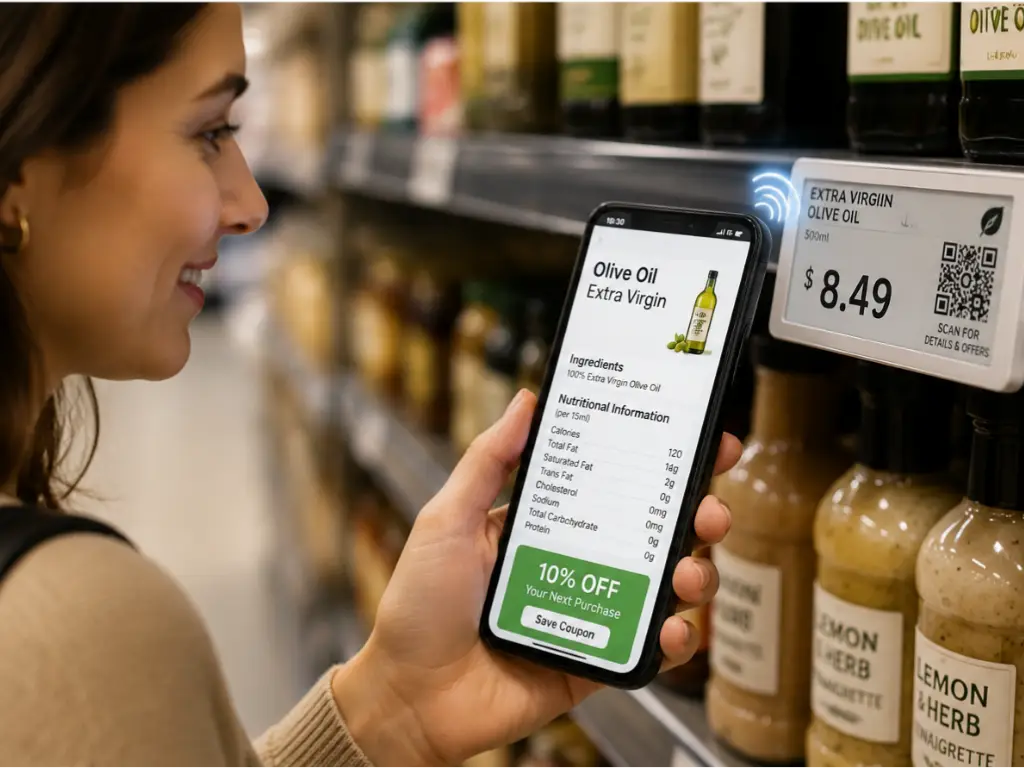
For smaller stores or interaction-heavy use cases, BLE (Bluetooth Low Energy) lets tags communicate directly with smartphones — a shopper can tap their phone to see product details, or staff can update prices from a handheld device. NFC (Near Field Communication) takes this further: tags can operate without any battery at all in passive mode, powered entirely by the shopper’s phone during a tap. The trade-off is range — NFC works only within about 3 centimeters.
The system wakes a tag from deep sleep, sends the new price data, confirms the update was received, and puts the tag back to sleep. The whole cycle takes under 60 seconds. The tag is awake and drawing power for less than one minute per update — which is how a coin cell lasts for years.
Which protocol is “best”? It depends on your store. A 50,000-SKU hypermarket needs the range and reliability of 2.4GHz. A boutique clothing store that wants shoppers to tap tags for fabric details might prefer NFC. A mid-size grocery chain might run BLE for its simplicity. The right answer is always the one that fits your physical space and operational workflow — and a competent manufacturer should help you make that call, not push a one-size-fits-all solution.
03Key Benefits for Retailers
Technology is only worth adopting if it solves a real problem. Here is what digital price tags deliver — translated from technical capability into operational impact.
| Benefit | What It Means | Real Impact |
|---|---|---|
| Labor Savings | Prices update centrally, not manually — one click replaces hours of shelf-walking | Mid-size stores save 40+ staff hours per week previously spent on tag changes (IW Technologies, 2025) |
| Price Accuracy | Shelf price always matches the register — guaranteed by system sync, not human diligence | Eliminates checkout disputes, regulatory fines, and the trust erosion of “that sign said $X” |
| Dynamic Promotions | Flash sales, time-limited offers, and end-of-day markdowns roll out instantly across all locations | Compete with online retailers on pricing agility without adding staff workload |
| Sustainability | No paper, no ink, no adhesive backing, no printer consumables — the tag is the label | A system-scale deployment eliminates literally tons of paper waste per year; tags last 5–10 years before replacement |
| Customer Experience | QR and NFC codes on every tag let shoppers scan for product details, reviews, allergens, or loyalty offers | Bridges the online-offline gap — the shelf becomes a digital touchpoint |
| Compliance | Consistent, auditable pricing across all locations | Meets consumer protection requirements for transparent pricing without manual enforcement |
The common thread across all six benefits: the system eliminates the gap between what the central database says and what the customer sees on the shelf. Every pricing error, every promotional delay, every hour of staff time spent walking aisles with a label gun — these are all symptoms of that gap. Digital price tags close it.
But not all digital price tags are the same. The screen technology and communication protocol inside matter — a lot. The next section explains why.
04Types of Digital Price Tags
Choosing a digital price tag system boils down to two technical decisions: what kind of screen you use, and how the tags communicate. Most online guides skip this entirely. Here is what you actually need to know.
E-Paper vs. LCD — Choosing the Right Display
The vast majority of shelf-edge digital price tags use e-paper — and for good reason. But LCD has its place, and understanding the trade-offs prevents expensive mistakes.
| Dimension | E-Paper (E-Ink) | LCD |
|---|---|---|
| Power consumption | Near-zero (only uses power when changing image) | Continuous (requires constant refresh) |
| Sunlight readability | Excellent — reflective, no glare | Poor — washes out under bright light |
| Color capability | Monochrome standard; tri-color and quad-color available (black/white/red/yellow) | Full color, 2K resolution, vibrant |
| Lifespan | 5–10 years, 100,000+ refresh cycles | 50,000 hours (≈5.7 years continuous) |
| Video / animation | No — static display only | Yes — full motion |
| Best use case | Shelf-edge pricing: grocery, pharmacy, convenience, hardware | Digital signage, premium retail displays, end-cap promotional screens |
| Relative cost | Lower per unit | Higher per unit; premium panels from BOE, LG, Samsung |
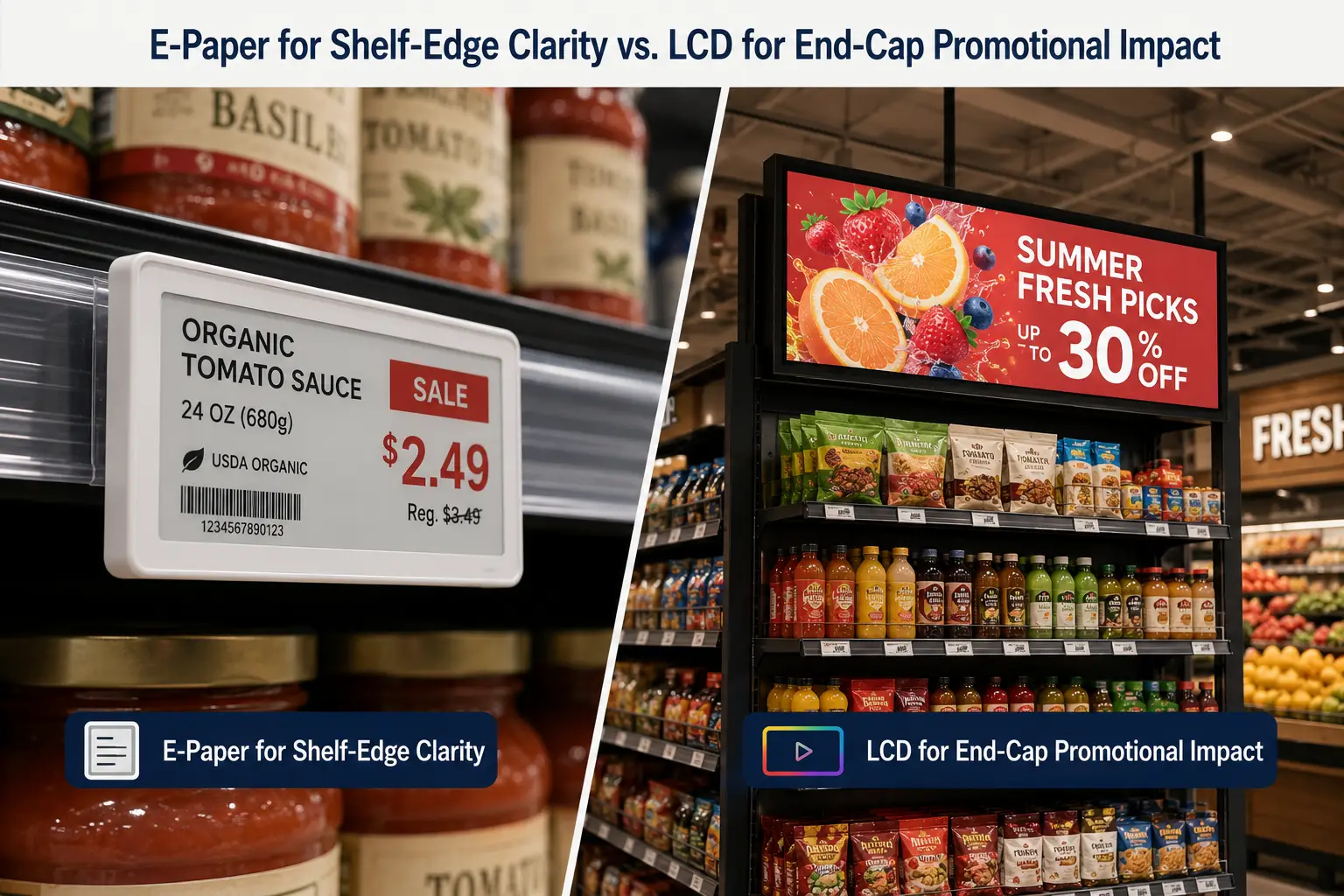
The rule of thumb is straightforward: if the tag’s primary job is showing a price and product name on a shelf rail, e-paper wins on every practical metric — battery life, readability, and cost. If the display is meant to attract attention, show promotional video, or serve as a digital sign rather than a price label, LCD is the better tool.
A well-designed store may use both: e-paper tags along every aisle, with a handful of LCD displays at end caps and promotional zones. The two technologies are complementary, not competing.
Communication Protocols Compared
Your second decision is the wireless protocol. Different protocols suit different store types. Getting locked into the wrong one creates frustration.
| Protocol | Typical Range | Power Profile | Best For | Shopper Interaction |
|---|---|---|---|---|
| 2.4GHz (proprietary) | 15–30m indoors | Low — deep sleep between updates | Supermarkets, hypermarkets, large-format retail | No (infrastructure-only) |
| 433MHz | 30m+, strong wall penetration | Low | Multi-story stores, warehouses, industrial | No |
| BLE | ~10m | Very low | Small-to-mid stores, convenience, specialty retail | Yes — phone connects directly |
| NFC | <=3cm (touch) | Zero in passive mode | Luxury, pharmacy, interactive displays | Yes — tap-to-learn |
Which Type Fits Your Store?
Here is a practical starting point — not a prescription, but a framework for your own evaluation:
- Supermarkets and hypermarkets (>10,000 SKUs): E-paper + 2.4GHz. Coverage and reliability are the priorities.
- Convenience stores and small grocery (<5,000 SKUs): E-paper + BLE. Easier to deploy, lower infrastructure cost.
- Pharmacies and health/beauty retailers: E-paper + NFC. Enables customer tap-for-information interactions — increasingly expected in regulated product categories.
- Luxury boutiques and premium retail: LCD for visual impact at key display points; e-paper for standard shelf edges.
- Warehouses and distribution centers: Industrial-grade e-paper + 433MHz. Range and penetration over aesthetics.
A qualified manufacturer will walk through these decisions with you based on your store’s actual layout, SKU count, and operational workflow. Your job is not to become a wireless engineer — it is to know enough to ask the right questions.
05What Digital Price Tags Don’t Do
Whenever a new retail technology reaches public awareness, fears follow. Digital price tags have attracted three persistent myths — all of them wrong, but all of them worth addressing directly.
Myth 1: “They enable surge pricing.” They do not. Digital price tags display prices that a human has already approved in the management system — usually in scheduled batches, often during overnight hours when stores are closed. The tag does not decide the price; it shows the price that was set by a store manager or pricing team. Every customer in the store sees the same price on the same tag at the same time. The National Retail Federation has addressed this concern directly: ESL systems do not enable the kind of real-time, per-customer price variation that people fear from ride-sharing apps (NRF, 2025).
Myth 2: “They track customers.” They do not. ESL tags have no cameras, no microphones, and no ability to interact with a shopper’s phone unless the shopper deliberately taps an NFC-enabled tag. The system is a closed loop between the management software, the base station, and the tags. It does not know who is standing in front of the shelf. It only knows which tag needs which price.
Myth 3: “They collect personal data.” They do not. A digital price tag stores exactly one kind of information: what to display on the screen. It does not collect, store, or transmit any data about customers — because it has no mechanism to do so. The entire data flow runs from the back office to the shelf, not the other way around.
These clarifications matter because retail technology adoption depends on customer trust. The shelf edge is where trust is either earned or broken — and digital price tags, correctly implemented, strengthen that trust by ensuring the price you see is the price you pay.
06Cost and ROI — What to Expect
Digital price tags are an investment, not an expense. The useful question is not “how much does a tag cost?” but “how quickly does the system pay for itself?” The answer depends on your store’s scale — but the math is clearer than most retailers expect.
What You Are Actually Paying For
The total cost of an ESL system has five components, and the per-tag price is only one of them.
Hardware typically accounts for 50 to 60 percent of the initial investment: the tags themselves plus base stations. Tag unit costs vary by size, protocol, and display type. For standard e-paper tags the range is accessible enough that mid-size chains routinely deploy tens of thousands of units.
Software licensing is the second component — and this is where vendor models diverge significantly. Some charge annual subscription fees per store or per tag. Others offer a one-time purchase with free lifetime updates. The difference over a five-year deployment can be substantial. Ask about the software model early in your vendor evaluation.
Installation and deployment covers on-site base station mounting, system integration with your POS or ERP, template design, and initial tag programming. For a single store, this can often be completed within a few days.
Ongoing maintenance is minimal relative to paper-based systems. Tags have no moving parts. Batteries last 3 to 5 years in standard use and 5 to 10 years in premium models. When a battery does eventually deplete, the tag is replaced — not repaired. Software updates are typically remote and, depending on your license model, free.
How Quickly ESL Pays for Itself
The ROI timeline for digital price tags tracks closely with store size and price-change frequency. Industry data from multiple deployments converges on these ranges:
- Large supermarkets (>20,000 SKUs): 8 to 12 months. High labor savings from eliminating weekly paper-tag changes across tens of thousands of items, plus reduced error-related losses.
- Mid-size grocers and chains (5,000–20,000 SKUs): 12 to 18 months. The labor and error-elimination math holds, just at a smaller absolute scale.
- Small independent stores (<5,000 SKUs): 18 to 36 months. The payback takes longer because there is less labor to save, but the system still eliminates pricing errors and frees staff for customer-facing work.
The dominant ROI driver across all store sizes is labor. A store with 8,000 SKUs and two price changes per month spends roughly 40 staff hours per month just printing and replacing paper labels. At standard retail wages, that alone often covers the system cost within the first year. Add the elimination of pricing-dispute labor — every “that price is wrong” conversation at the register consumes 5 to 10 minutes of staff and manager time — and the savings compound further.
Error elimination is the second-largest factor but harder to quantify upfront. Price discrepancies between shelf and register trigger customer complaints, erode trust, and, in regulated markets, attract fines. Digital price tags eliminate the discrepancy entirely. The shelf becomes a direct mirror of the POS database.
A practical way to estimate your own ROI: multiply your store’s weekly label-change labor hours by your average hourly wage, then multiply by 52. If that number approaches or exceeds the per-store system cost, your payback period is likely under 18 months.
07Getting Started with Digital Price Tags
If you have read this far, you are past the “what is it” stage and into “should I do this” territory. Here is a clear path forward — no consultant-speak, no pressure.
Start with an honest self-assessment. You are likely a good candidate for digital price tags if you answer yes to most of these:
- You operate more than one store, or plan to expand
- Your SKU count is in the thousands (not hundreds)
- Prices change at least weekly — promotions, seasonal markdowns, or competitive adjustments
- Pricing errors at the shelf have caused customer complaints or internal headaches
- You have (or can get) basic IT support for the initial setup
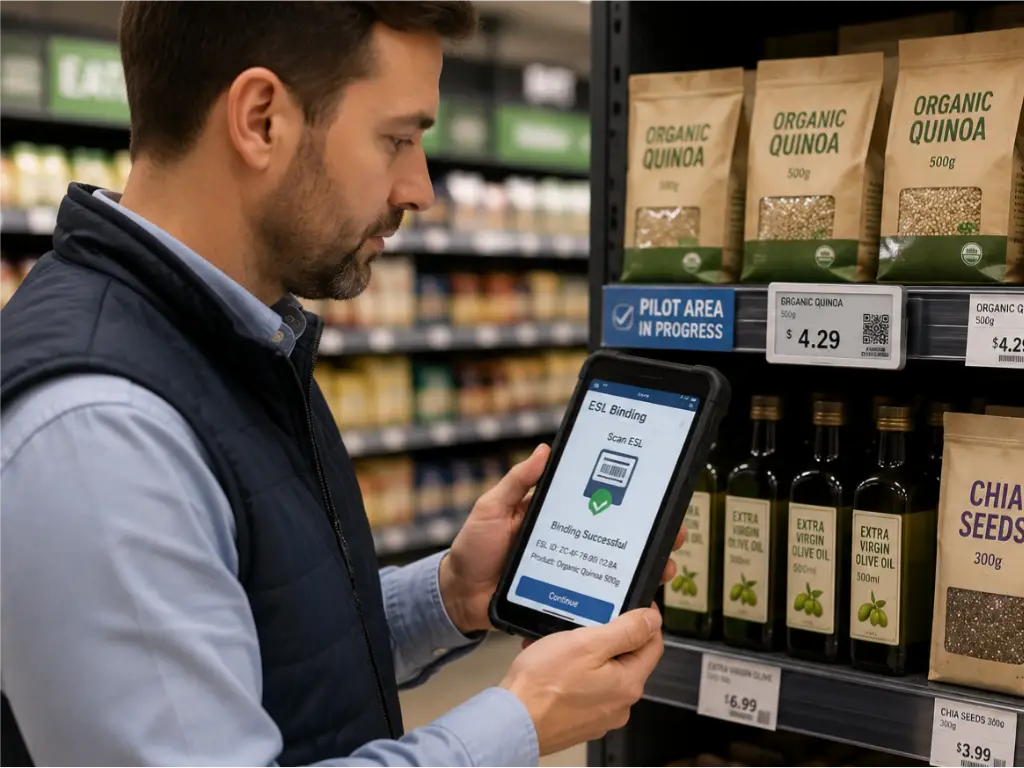
If you checked most of those boxes, the next step is a pilot — not a full rollout. Pick one store, or even one department within a store. Deploy 500 to 1,000 tags. Run the system for three months. Measure the actual labor savings, error reduction, and staff feedback. The pilot answers the question no sales pitch can: “how does this work in my operation, with my team?”
When you are ready to evaluate vendors, focus on three things that matter more than the tag price:
Protocol coverage. Does the manufacturer offer the full range — 2.4GHz, 433MHz, BLE, NFC, and Wi-Fi — or are they locked into a single technology? A vendor who only sells 2.4GHz tags will tell you 2.4GHz is all you need, whether or not that is true for your store type. Look for a manufacturer that can match the protocol to your floorplan, not the other way around.
Software terms. One-time purchase with free lifetime updates, or annual subscription? Both models exist. Know which one you are signing up for and calculate the five-year cost difference before comparing tag prices.
After-sales support. A one-year hardware warranty with a replacement policy — not a repair-and-return cycle — and responsive technical support are non-negotiable. When a tag stops working, you need a replacement shipped, not a repair ticket.
Some manufacturers — Zhsunyco, for instance — ship free test software (eDesigner and Config Tool) that lets you set up a small test environment on your own hardware before committing to anything. That kind of no-obligation trial is worth prioritizing: if a vendor’s system does not play nicely with your existing POS or network setup, you want to discover that during the pilot, not after signing a purchase order.
The shelf edge is where retail happens. It is where customers decide what goes in the cart. It is where they judge whether your store feels well-run or chaotic. Getting pricing right at that edge — accurately, instantly, and consistently — is not some futuristic ideal. It is a solved problem. The only question left is when you are ready to solve it.
References
- National Retail Federation (NRF). “Making the Case for Electronic Shelf Labels.” 2025. https://nrf.com/blog/making-the-case-for-electronic-shelf-labels
- IW Technologies. “ROI of Electronic Shelf Labels for Retail.” 2025. https://www.weareiw.com/blog/roi-electronic-shelf-labels-retail/
- Zhsunyco. “Digital Price Tag Solutions.” https://www.zhsunyco.com/

 English
  Russian
  Spanish
  German
  Arabic
  French
  Bulgarian
  Polish
  Romanian
  Turkish
  Portuguese