


POS System Equipment: A Procurement Guide to Hardware Selection and Supplier Evaluation
01What POS System Equipment Actually Includes
Walk into any modern retail store and you will see a checkout counter with a screen, a card reader, a cash drawer, and a scanner. That is the visible surface. Underneath it, these devices connect to a central processing unit running software that handles transactions, updates inventory, and feeds data into reporting dashboards none of your customers will ever see.
A complete POS system equipment setup includes a processing terminal (the computing brain), a payment terminal or card reader, a cash drawer, a receipt printer, a barcode scanner, and optionally a customer-facing display and an uninterruptible power supply (UPS). Additional peripherals — label printers, shipping scales, kitchen display systems — extend the system for specific use cases like grocery weighing or restaurant order routing.
Here is the key insight most first-time buyers miss: a POS terminal is not just a computer with a touchscreen. It is the hub of a peripheral ecosystem. Every component you connect — from the receipt printer to the barcode scanner — must be compatible with the terminal’s operating system, driver library, and physical ports. Choose the wrong terminal architecture, and you will spend more on compatibility workarounds than you saved on the hardware itself.
Knowing what the components are is step one. Knowing what separates a system that runs 24/7 for five years from one that dies in 18 months — that is where the real money lives.
02Core POS Hardware Components — What Separates a Reliable Setup from a Fragile One
The hidden cost of POS hardware is not in the sticker price of any single component. It lives in the product of three variables: interface compatibility, sustained operational stability, and after-sales responsiveness. A $30 savings on a barcode scanner that fails to pair with your terminal’s OS is not a saving — it is a cash register that sits idle while customers queue.
The Computing Core — POS Terminals, All-in-Ones, and the Tablet Trap
Your POS terminal is the single most consequential hardware decision you will make. Get this wrong, and every peripheral downstream inherits the bottleneck. The market offers four distinct architectures, and they are not interchangeable.
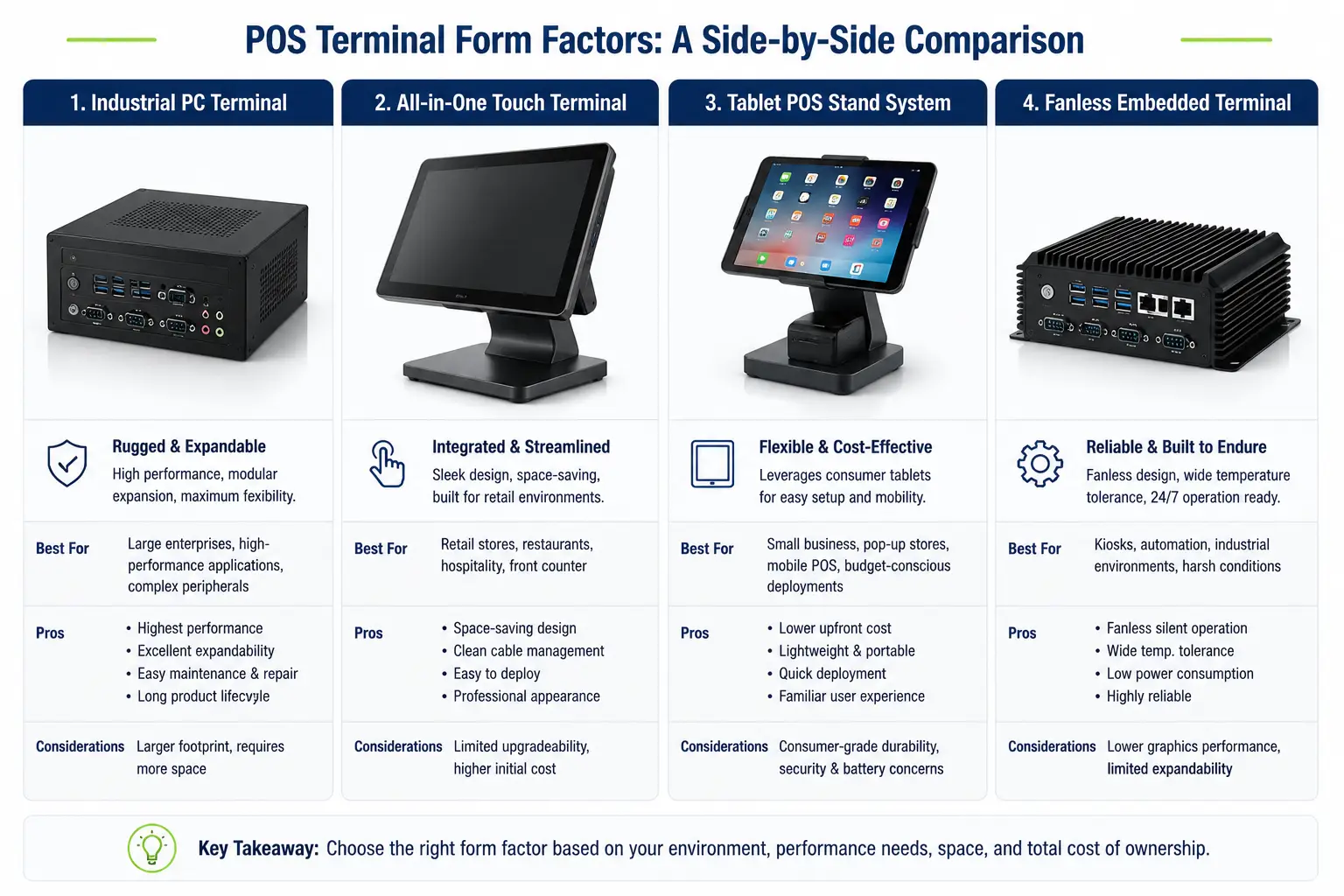
PC-based industrial computers run Windows or Linux on desktop-grade or embedded processors. They are built on workstation-class chipsets — Intel’s Q470 or H610 series — with locked-down BIOS, multiple RS-232 serial ports for legacy peripherals, and internal expansion slots. These units dominate high-throughput retail and supermarket environments because they handle 8–12 connected devices simultaneously without driver conflicts. Typical lifespan: 4–6 years under 24/7 operation. Price range: $400–$1,000+ per unit.
All-in-one touchscreen terminals integrate the display, processor, and sometimes the payment module into a single chassis. They save counter space and reduce cable clutter, making them popular in boutique retail and quick-service restaurants. The trade-off: internal components are harder to service, and thermal management in a slim chassis is an engineering challenge. Not all all-in-ones are created equal — units built around Intel Q470 or equivalent embedded chipsets can match PC-based reliability; those built around tablet-grade ARM processors cannot.
Tablet-based POS (iPad or Android) appeals to pop-up shops, food trucks, and low-volume boutiques. The hardware is cheap — $329 for a base iPad, $150 for a stand, $49 for a card reader — and the setup takes minutes. But tablets were never designed to drive receipt printers, cash drawers, and barcode scanners simultaneously for 12-hour shifts. Peripheral connectivity relies on Bluetooth or single USB-C/Lightning ports with hubs, introducing pairing instability under sustained load. For businesses processing under 50 transactions per day, a tablet setup may suffice. For anything beyond that, the reliability math shifts fast.
Embedded fanless terminals are purpose-built POS units running Android or Linux on industrial-grade ARM or low-power x86 boards. They are fanless, compact, and often VESA-mountable. The fanless design eliminates dust ingestion — a real problem in bakeries, warehouses, and outdoor kiosks — but introduces a thermal trade-off: without active cooling, sustained CPU load under hot ambient conditions pushes internal temperatures past component ratings, silently degrading capacitor life. Fanless is not a guarantee of industrial reliability. It is a thermal design choice that needs proper heat-pipe dissipation and validated testing to back it — not just a passive heatsink and a marketing claim.
| Type | Best For | Reliability Rating | Typical Lifespan | Price Range (USD) |
|---|---|---|---|---|
| PC-based industrial | High-throughput retail, supermarkets | ★★★★★ | 4–6 years | $400–$1,000+ |
| All-in-one touchscreen | Boutique retail, QSR | ★★★★☆ | 3–5 years | $250–$800 |
| Tablet-based (iPad/Android) | Pop-ups, food trucks, <50 tx/day | ★★☆☆☆ | 1–3 years | $200–$600 |
| Embedded fanless | Bakeries, kiosks, light industrial | ★★★☆☆ | 2–4 years | $150–$500 |
The Peripheral Ecosystem — Printers, Scanners, Drawers, and the Compatibility Tax
Peripheral selection is where the “I will just buy whatever is cheapest” instinct does the most damage. A receipt printer that speaks only USB HID when your POS software expects OPOS drivers will not print a single line — regardless of how well-reviewed it was on the marketplace listing.
Receipt printers come in two technologies. Thermal printers (203 dpi or 300 dpi) use heat-sensitive paper — no ink, no ribbon, minimal maintenance. They dominate modern retail because they are fast (up to 350 mm/s print speed) and quiet. Impact/dot-matrix printers survive in restaurant kitchens because they can print on carbon-copy paper and handle heat and grease better than thermal mechanisms. The compatibility trap: many thermal printers expose a proprietary command set rather than standard ESC/POS, locking you into specific POS software.
Barcode scanners range from $30 handheld 1D laser units to $500+ 2D imagers that read QR codes, damaged barcodes, and phone screens. The metric that matters in high-volume retail is decode speed — measured in milliseconds per scan, not “scans per second.” A scanner that takes 200ms per decode in a supermarket lane processing 40 items per minute adds 8 seconds of cumulative delay per customer. Over 500 customers a day, that is over an hour of lost throughput.
Cash drawers are deceptively simple. Most connect via RJ11 to the receipt printer, which sends a 12V/24V pulse to the drawer’s solenoid to open it. The failure mode almost nobody checks: if your POS software sends the drawer-open command via the printer driver, and your printer is a different brand than your drawer, the voltage specifications may not match. The drawer stays locked. Test this specific integration — printer → drawer open — during evaluation, not after installation.
Customer-facing displays serve two roles: transaction transparency (the customer sees what is being rung up) and marketing real estate (promotions, loyalty sign-ups). Pole displays using VFD (vacuum fluorescent display) technology offer the best sunlight readability but consume more power. LCD pole displays are cheaper and lower power but lose visibility at acute angles. The trend is toward larger tablet-style customer screens (7–10 inches) that double as signature capture and promotion surfaces.
Before ordering any POS peripheral, confirm: (1) OS driver support for your terminal’s operating system (Windows OPOS, Android AIDL, or Linux CUPS), (2) physical port match (USB-A / USB-C / RS-232 / RJ11), (3) power delivery method (bus-powered vs external adapter), (4) the specific POS software version you are running lists this device as supported.
Setup Configurations by Business Type — One Size Fits Nobody
The “mobile seller vs boutique vs multi-lane” framework you see when researching how to set up a POS system is too coarse for B2B procurement. A more useful lens is a two-axis matrix: business format × store count.
Retail — single store: Start with an all-in-one touchscreen terminal (i5-class processor, 8GB RAM, 256GB SSD), a thermal receipt printer, a 2D barcode scanner, and a customer-facing pole display. Budget $1,200–$2,000 for hardware. The most common mistake: buying a terminal with only 2 USB ports, then discovering you need 4 (scanner + printer + customer display + backup drive).
Retail — multi-location (3–50 stores): Standardize on one terminal model with a proven peripheral compatibility matrix across all stores. Centralized procurement means one bad hardware decision multiplies across every location. Insist on the vendor providing a compatibility certification document — not a verbal assurance — for the exact terminal + printer + scanner + drawer combination you are deploying.
Restaurant / QSR — single or multi-location: Prioritize spill resistance (IP54 minimum on all front-of-house equipment), kitchen-grade thermal printers with splash guards, and a kitchen display system (KDS) that replaces paper tickets. The fatal mistake in restaurant POS: choosing terminals without locking USB ports — a busy server will yank cables accidentally, and a loose cable in the middle of dinner service means lost revenue by the minute.
Supermarket / grocery: High-throughput barcode scanning (2D imager, ≥100 scans/minute sustained rate), integrated scale for weighed items, and a terminal that supports dual displays — one for the cashier and one customer-facing. The throughput math is unforgiving: shaving 5 seconds off per-transaction processing across 10 lanes and 500 daily customers saves 7 hours of cumulative checkout time every day.
03Industrial-Grade vs Consumer-Grade: The Hidden Cost of Cheap POS Hardware
Most Google results for “POS system equipment” will not tell you this: swap out the terminal for a unit that costs $100 less, and your total cost of ownership over three years can double. Not because the cheap unit is less capable on day one. Because it was never designed to survive day 500.
Why Budget POS Terminals Fail — Capacitors, Cooling, and Chipset Compromises
Open a $150 POS terminal and a $400 industrial terminal side by side. The processors may look comparable on a spec sheet — both “quad-core, 2.0 GHz.” The difference is in the components that keep the processor alive.
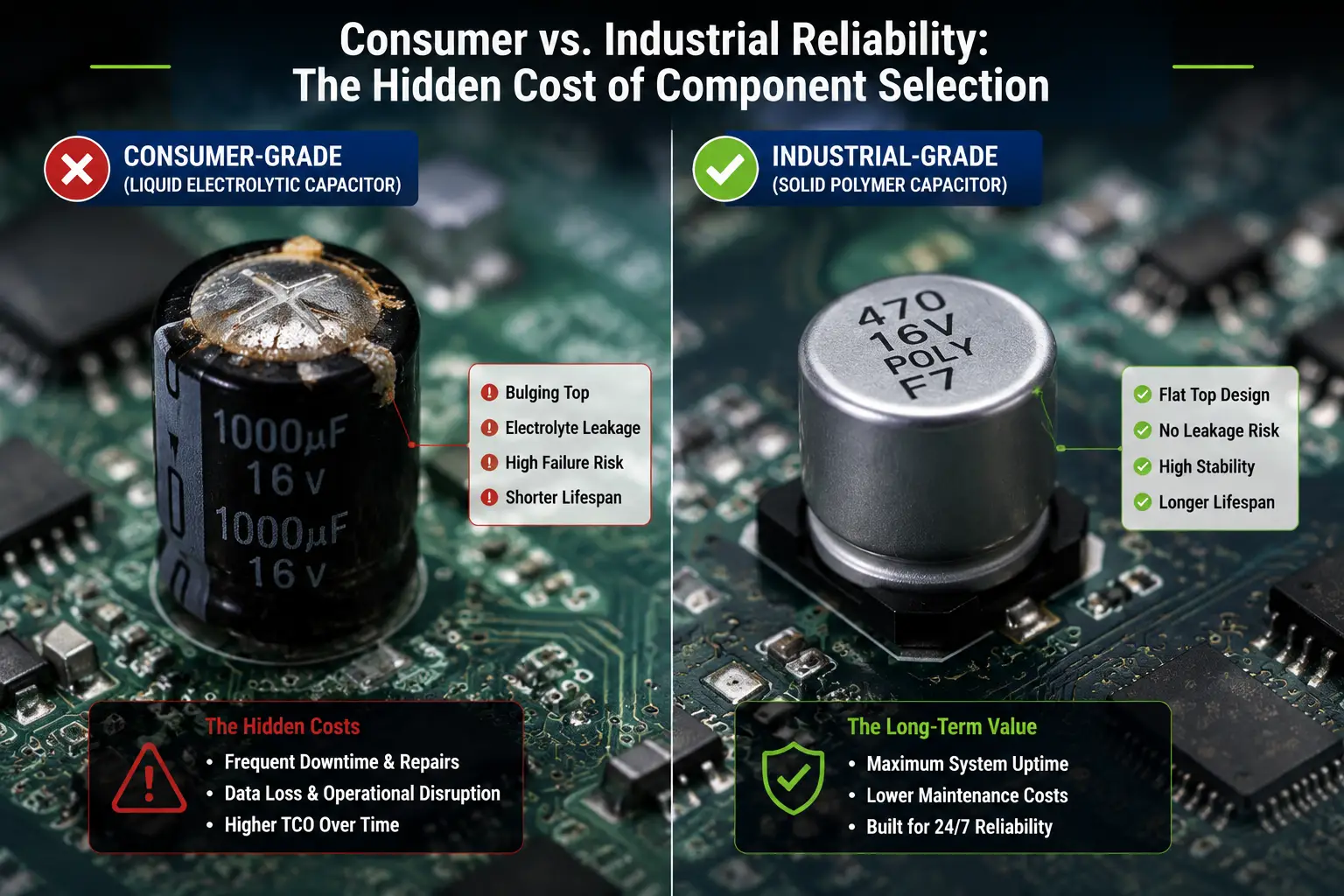
Capacitors are the number one failure point in electronics that run continuously. Consumer-grade terminals use liquid electrolytic capacitors rated for 2,000–5,000 hours at 105°C. Inside a poorly ventilated checkout counter running 16-hour days, internal chassis temperatures easily reach 60–70°C. At those temperatures, the electrolyte dries out. The capacitor swells. The motherboard becomes unstable — random reboots, blue screens, data corruption. Industrial terminals use solid polymer capacitors rated for 50,000+ hours. Same 105°C rating, fundamentally different chemistry. There is no liquid to evaporate, so the capacitor does not dry out.
Cooling design is the second differentiator. Consumer terminals use a small fan that pulls in ambient air — along with dust, flour particles in a bakery, and grease aerosol in a kitchen. The fan clogs. Airflow drops. Internal temperatures spike. And those liquid capacitors degrade even faster. Industrial terminals either use fanless designs with engineered heat-pipe dissipation or sealed fan units with dust filters and positive-pressure chassis design. A fanless terminal without proper thermal engineering is arguably worse than a well-designed fanned unit, because trapped heat cooks components silently.
Chipset selection is the layer most procurement teams never look at. Intel’s Q470 chipset was designed and validated for 24/7 embedded and industrial workloads. It supports vPro remote management, ECC memory in some configurations, and has been qualified across a temperature range of 0–50°C. Intel’s H610 — commonly found in $150–$250 “commercial” POS units — is a consumer desktop chipset. It works fine at 25°C in an air-conditioned office. At 45°C inside a checkout counter in a non-AC retail space during summer, I/O errors begin to accumulate. The chipset itself does not fail — it just starts losing USB packets, dropping serial data, and corrupting print jobs intermittently in ways that no diagnostic tool will flag as a hardware fault.
What “Industrial-Grade” Actually Means — A Specification Benchmark
The term “industrial-grade” has no legal definition, and every manufacturer applies it differently. Here is a benchmark table you can use to cut through the marketing language:
| Specification | Consumer-Grade | Commercial-Grade | True Industrial-Grade |
|---|---|---|---|
| Motherboard chipset | Consumer H610 / B-series | H610 / Q470 (mixed) | Q470 / HM770 / embedded |
| Capacitor type | Liquid electrolytic (2000–5000h @105°C) | Mixed (some solid) | Solid polymer (50000+h @105°C) |
| Cooling architecture | Basic fan, no filter | Fan with filter OR basic fanless | Hybrid (heat-pipe + smart fan) OR sealed fanless |
| Operating temperature range | 0–35°C | 0–40°C | 0–50°C (validated) |
| MTBF (Mean Time Between Failures) | ~15,000 hours | 30,000–50,000 hours | 100,000+ hours |
| IP rating (dust/liquid) | IP20 (none) | IP40–IP42 | IP54 minimum |
| Standard warranty | 1 year | 1–2 years | 3–5 years (mainboard) |
The $100 Trap — Total Cost of Ownership Math That Most Buyers Miss
Let us run the numbers on a 10-lane retail deployment over three years.
Scenario A: $200 consumer-grade terminals × 10 units = $2,000 upfront. First-year failure rate of 15–25% means 2 units fail within 12 months. Each failure requires: a replacement unit ($200), express shipping ($40), an IT technician for installation and configuration (2 hours × $75/hr = $150), and — critically — one checkout lane down for an average of 4 hours. At a modest $300/hour in lost revenue per lane during peak periods, that is $1,200 in downtime per failure. Two failures in year one = $3,180 in unplanned costs. Year two brings another 2–3 failures as the remaining units age. Total 3-year cost: roughly $14,000–$17,000.
Scenario B: $400 industrial-grade terminals × 10 units = $4,000 upfront. First-year failure rate of 2–5% means zero to one failure in the first 18 months. Even with one failure, the same replacement costs apply (~$1,590). By year three, total unplanned costs are under $2,500. Total 3-year cost: roughly $8,000–$10,000.
The consumer-grade setup looks 50% cheaper on the purchase order. It ends up 40–60% more expensive by the time you replace the third unit. And none of this math accounts for the reputational cost of a checkout lane going dark during Saturday rush hour.
This is not an argument for always buying the most expensive hardware. It is an argument for factoring mean time between failures into your unit price comparison. A $400 terminal with a 100,000-hour MTBF costs $0.004 per hour of expected operation. A $200 terminal with a 15,000-hour MTBF costs $0.013 per hour — more than 3× the hourly cost when you normalize for reliability.
04How to Evaluate POS Hardware Manufacturers — A Practical Screening Framework
The first principle of POS hardware sourcing: you are not shopping for a product. You are selecting a manufacturing partner whose quality control standards will determine whether your checkout lanes stay open for the next five years. The cheapest quote almost never comes from the most reliable factory. The most responsive sales rep does not guarantee responsive after-sales support. The only reliable signal is structured verification.
Step 1 — Building a Shortlist: Where to Look and What to Filter
The global POS hardware supply chain is heavily concentrated. Roughly 70% of the world’s POS terminals and peripherals are manufactured in China. The primary clusters are in Shenzhen, Guangzhou, and Dongguan (Guangdong province) for high-volume production, with Shanghai specializing in IoT-connected and cloud-enabled devices. This geographical concentration means your sourcing strategy should start with manufacturer discovery, not brand browsing.
Three sourcing channels, in priority order:
B2B verification platforms (Alibaba.com, Made-in-China, Global Sources) allow you to filter by supplier type. The critical distinction: an “Assessed Supplier” on Alibaba has passed a third-party verification of business registration and factory existence. A “Verified Supplier” (金品诚企) has undergone a deeper audit including on-site inspection by a third-party agency like TÜV or SGS. A supplier with neither badge may be a legitimate factory, but you have no third-party evidence — treat them as unverified until you produce your own.
Industry trade shows — Canton Fair (Guangzhou, April/October), RetailTech Japan (Tokyo, March), and EuroShop (Düsseldorf, every 3 years) — are where manufacturers bring physical units you can inspect, power on, and benchmark in person. The value is not just seeing the product. It is watching how the manufacturer’s technical staff answer detailed questions about chipset selection, thermal design, and MTBF testing.
Certification registries — PCI Security Standards Council maintains a public list of PCI PTS (PIN Transaction Security) approved devices. If a manufacturer claims PCI compliance, verify the device appears on that list. An ISO 9001 certificate without a certificate number and issuing body name is not a certificate — it is a PNG file.
Hard filters for your shortlist:
- Operating history of 5+ years (POS manufacturing specifically, not general electronics)
- ISO 9001:2015 certification with verifiable certificate number
- Self-owned SMT (surface-mount technology) production lines — visible in video or audit
- Willingness to provide a live video factory tour of specified production areas
- At least one verifiable client reference in your target region
- Operating history of 5+ years (POS manufacturing specifically, not general electronics)
- ISO 9001:2015 certification with verifiable certificate number
- Self-owned SMT production lines — visible in video or audit
- Willingness to provide a live video factory tour of specified production areas
- At least one verifiable client reference in your target region
Step 2 — Deep Verification: Factory Audits, Sample Testing, and Reference Calls
A shortlist of 3–5 suppliers is where the real work begins. Three verification stages separate the factories you can trust from the ones with a good website.
Remote verification — the live video tour: Request a real-time video walkthrough — not a pre-recorded promotional video — covering three specific areas: the SMT production line (look for automated optical inspection or AOI stations next to the pick-and-place machines — their absence means quality inspection is manual and inconsistent), the aging test room (burn-in racks with units running continuously — the industry benchmark is 72+ hours of powered operation before shipping), and the QC inspection station (electron microscope for PCB inspection, ESD-protected flooring and wrist straps on all workers). A factory that hesitates to show you these three areas live, right now, is hiding something.
Sample testing beyond basic function: Order 2–3 sample units and test beyond “it turns on.” Run a 72-hour continuous power-on test. Test every peripheral port — not just the one you plan to use. Cycle the unit through a thermal chamber if you have access: 0°C cold start, 50°C sustained operation, rapid humidity change. Check boot time, touchscreen calibration drift over 24 hours, and peripheral disconnection/reconnection behavior. The purpose is not to break the sample — it is to see how it degrades under stress.
Reference calls that matter: Ask for three reference customers in your region or industry vertical. Then actually call them. Do not ask “Are you happy with the supplier?” — that gets a polite yes. Ask: “How many units did you deploy, and how many required service in the first year? What was the average response time for a technical issue? Did you reorder, and if so, was the second batch consistent with the first?” The answers — or the supplier’s reluctance to provide contacts — tell you more than any spec sheet.
What does a manufacturer that passes all these checks actually look like? Consider the profile: 12 SMT production lines in a 20,000m² facility, CE / ISO 9001 / RoHS / TF16949 certified, an 11-step QC process that includes electron microscope inspection at multiple production stages, and a policy of providing live video factory tours on request. Zhsunyco, a top-tier Chinese ESL and retail IoT manufacturer headquartered in Shenzhen, is one example of a supplier whose factory floor and certification portfolio align with every verification benchmark listed above — a useful reference for what “verified manufacturing capability” looks like in practice. Their quality assurance documentation and customization workflow, both publicly available, illustrate the level of transparency to expect from a credible supplier (see their certifications and full-spectrum customization capabilities).
Step 3 — Negotiation and Risk Management: Terms That Matter More Than Price
Most procurement negotiations for POS hardware focus on per-unit price. That is a mistake. Five contractual terms have far greater impact on your three-year total cost than a 5% unit price discount.
Warranty scope: “1-year warranty” means nothing without specifying what is covered. Mainboard only, or entire terminal? Does the warranty cover the touchscreen (the most physically vulnerable component)? Does it include shipping costs for RMA units? Industrial-grade suppliers typically offer 3–5 years on the mainboard and 1–2 years on peripherals. Demand this granular breakdown in writing.
Spare parts commitment: POS terminals are deployed for 3–5 years, but chipset generations change every 18–24 months. If your terminal model is discontinued in year two, will the manufacturer still supply replacement mainboards in year four? A credible supplier commits in the contract to spare parts availability for a minimum of three years after end-of-production.
Defect rate ceiling: Specify an AQL (Acceptable Quality Level) in the purchase agreement. For POS hardware, industry standard is AQL 0.65 for major defects (device does not function) and AQL 1.5 for minor defects (cosmetic issues, loose accessories). If an incoming batch exceeds these thresholds, the contract should specify whether the remedy is batch return, supplier-paid rework, or price adjustment.
Payment structure: The standard three-stage payment — 20–30% deposit with order, 50–60% before shipment, 10–20% after acceptance — protects both parties. Avoid 100% upfront on first orders regardless of how much the supplier discounts. Use a platform with trade assurance (Alibaba Trade Assurance) or escrow for the first transaction.
After-sales SLA: “Fast response” is not a service level agreement. Specify: maximum response time to technical inquiries (≤ 4 hours during business hours is standard for industrial suppliers), remote diagnostic capability (can the supplier remotely access the terminal for troubleshooting?), spare parts dispatch timeline, and escalation path for unresolved issues.
05Certifications That Protect Your Investment — A Regional Compliance Roadmap
Skip the compliance homework and your POS hardware shipment may clear customs without issue. Or it may get seized, fined, and returned at your expense. Different regions enforce different requirements, and the responsibility for compliance falls on the importer — which means you.
North America: FCC Part 15 is mandatory for any electronic device sold or operated in the United States — it governs electromagnetic interference. UL certification (or an equivalent NRTL, Nationally Recognized Testing Laboratory mark) is not always legally required at the federal level, but most commercial landlords and insurance providers will not permit uncertified electrical equipment on their premises. For payment hardware specifically, PCI PTS (PIN Transaction Security) 5.x or 6.x compliance is non-negotiable if the terminal processes card payments. EMV Level 1 (hardware interface) and Level 2 (application kernel) certifications are required for chip-card acceptance.
European Union: CE marking is the legal minimum for market access — without it, your shipment does not clear EU customs. RoHS (Restriction of Hazardous Substances) compliance restricts six substance categories: lead, mercury, cadmium, hexavalent chromium, PBBs, and PBDEs. WEEE (Waste Electrical and Electronic Equipment) compliance governs end-of-life disposal obligations. GDPR is not a hardware certification, but POS systems that capture customer data for loyalty programs or receipts must operate on GDPR-compliant software infrastructure.
Global / cross-regional: ISO 9001:2015 is a quality management system certification, not a product certification. It tells you the manufacturer has documented and audited processes — a useful signal but not a substitute for product-level testing. ISO 14001 (environmental management) is increasingly required by enterprise procurement policies.
06Beyond the Terminal — Building a Connected Retail Ecosystem
You are not buying POS equipment for today. You are building the hardware foundation your retail operation will run on for the next 3–5 years. Two principles matter more than any individual component spec.
First, forward-compatibility. Does the terminal architecture you are choosing today leave room for the peripherals you might add in two years? A terminal with 2 USB ports and 1 RS-232 port may cover your needs now. When you add a customer-facing display, a loyalty kiosk, and an inventory RFID reader in year two, you will be buying USB hubs and praying for driver stability. Industrial terminals with 6+ USB ports and 3+ serial ports cost more upfront but eliminate the hidden cost of retrofitting.
Second, integration readiness. The biggest shift in retail technology over the past three years is not inside the POS terminal — it is in the ecosystem around it. Electronic shelf labels (ESL) are the most significant example. An ESL system connects to the POS/ERP backend through a lightweight messaging protocol — typically MQTT — and updates shelf-edge pricing in real time. For multi-location retailers, this integration means a price change made at headquarters propagates to every store, every shelf, in seconds — not days. The labor cost and error rate of manual price tag changes across hundreds or thousands of SKUs disappear.
The technology bridge between POS equipment and ESL systems is an open communication protocol. MQTT (Message Queuing Telemetry Transport) has emerged as the standard because it is lightweight, bidirectional, and works reliably over low-bandwidth connections — exactly what a retail IoT deployment needs. When evaluating POS hardware today, asking whether the terminal and its software ecosystem support MQTT-based peripheral integration is a practical test of whether you are building a system that can evolve or one that is already obsolete.
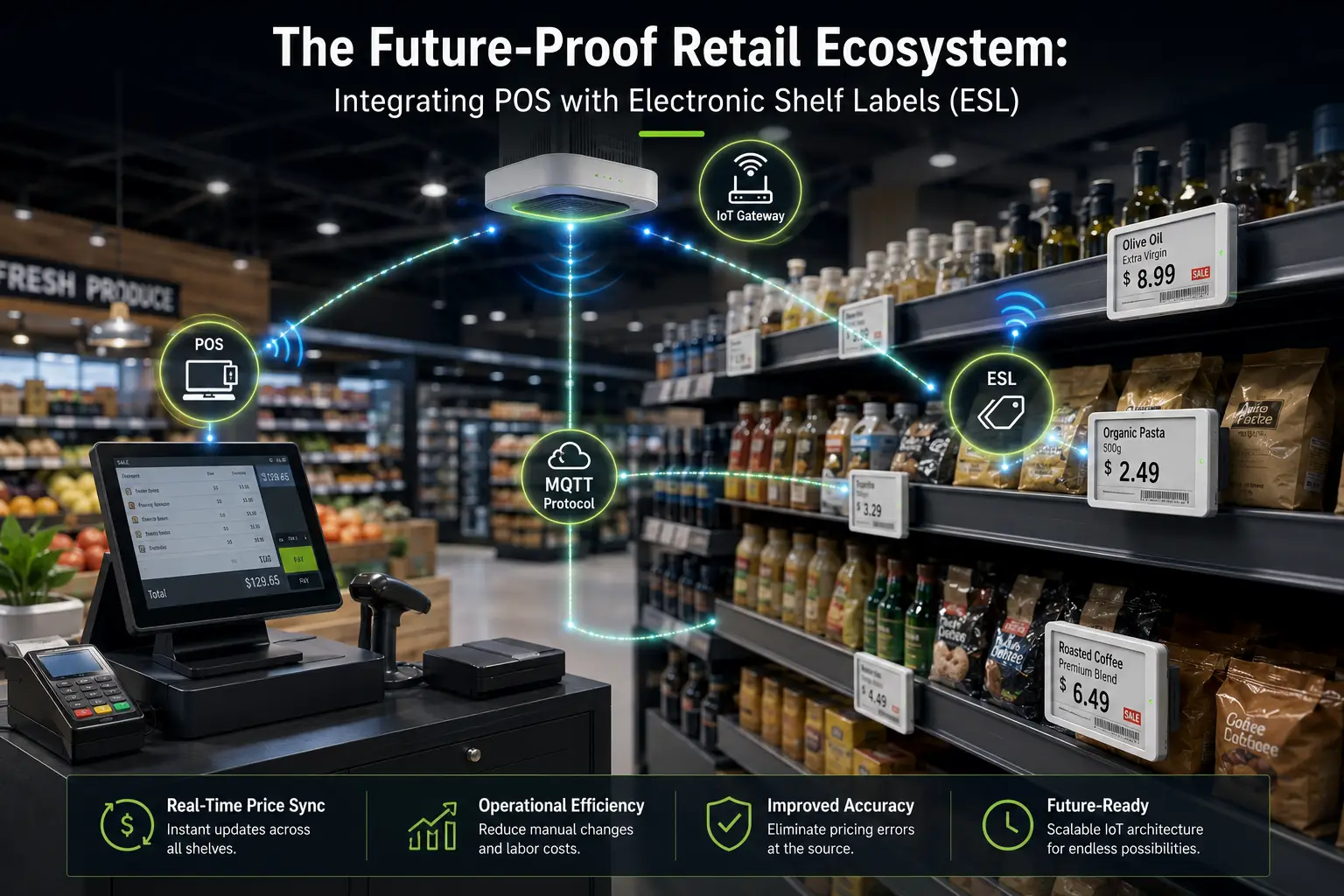
For businesses evaluating ESL solutions that connect directly with existing POS infrastructure, Zhsunyco offers MQTT-based open base stations that link ESL networks to POS, ERP, and CRM systems without proprietary middleware — cutting integration time and eliminating recurring software licensing fees. With deployments in 41,500+ stores across 180 countries, their hardware and software stack provides a reference architecture for what POS integration with shelf labels looks like at scale. You can explore their ESL systems and integration approach at zhsunyco.com/esl/ or contact their solutions team for a technical consultation.
References
- Shopify. “The Ultimate POS Hardware Guide for 2026: Devices, Setups & Costs.” 2026. https://www.shopify.com/ie/blog/pos-device
- SDLPOS. “POS Buying Guide 2025: How to Choose Reliable 24/7 Commercial POS.” 2025. https://sdlpos.com/procurement/pos-buying-guide-for-247-use/
- Touch Dynamic. “Finding The Right Hardware Manufacturer.” 2025. https://www.touchdynamic.com/blogs/news/finding-the-right-hardware-manufacturer
- MatsudaPOS. “How to Find a Trusted POS Hardware Manufacturer in China.” 2025. https://www.matsuda-pos.com/pos-hardware-manufacturer-china/
- Alibaba.com. “Strategic Sourcing of POS Machines: Evaluate Suppliers, Customization & Risk Metrics.” 2025. https://www.alibaba.com/price-comparison/pos-machine-supplier
- PCI Security Standards Council. “Approved PIN Transaction Security Devices.” https://www.pcisecuritystandards.org/assessors_and_solutions/pin_transaction_devices
- European Commission. “CE Marking.” https://single-market-economy.ec.europa.eu/single-market/ce-marking_en
- International Organization for Standardization. “ISO 9001:2015 — Quality Management Systems.” https://www.iso.org/standard/62085.html
- Zhsunyco. “Quality Assurance.” https://www.zhsunyco.com/quality-assurance/
- Zhsunyco. “Customization Services.” https://www.zhsunyco.com/customization/
- Zhsunyco. “Electronic Shelf Labels.” https://www.zhsunyco.com/esl/
- Zhsunyco. “Contact Us.” https://www.zhsunyco.com/contact-us/

 English
  Russian
  Spanish
  German
  Arabic
  French
  Bulgarian
  Polish
  Romanian
  Turkish
  Portuguese