


POS Integration API for Electronic Shelf Labels: REST vs MQTT, Cloud vs On-Premise — A Technical Decision Guide
01 Why POS-to-ESL Integration Is the Missing Link in Retail Automation
When you search for “POS integration API,” Google serves up page after page of payment terminal documentation — how to connect a card reader, process a transaction, route a refund through a payment gateway, or how to set up a POS system. But there is another POS integration scenario that barely registers in search results, yet quietly determines whether a retail chain’s pricing operations run on autopilot or on spreadsheets: connecting your POS system to Electronic Shelf Labels.
The scale of the problem is easy to underestimate. A typical mid-size supermarket manages 15,000 to 40,000 SKUs, with prices changing weekly for promotions, seasonal rotations, and competitor adjustments. In a manual workflow, staff walk the aisles printing paper tags from the back office, peeling off old labels, and sticking on new ones — a process that takes hours, introduces errors at a rate of 1 to 3 per 100 tags according to retail operations data, and creates a multi-day lag between a price decision at headquarters and its execution on the shelf. For a chain with 100 locations, a national promotion can take three to seven days to reach every store, during which time different stores display different prices for the same product.
Electronic Shelf Labels solve this by replacing paper with wirelessly updated e-paper displays. But the label hardware is only half the equation. The other half — and the part that determines whether the system becomes a seamless extension of your existing retail stack or yet another silo — is the API layer that connects your POS or ERP system to the ESL infrastructure. When integrated correctly, a price change entered in the POS propagates to the correct shelf label within seconds, and a confirmation signal returns to confirm the update succeeded. No walking, no printing, no data entry errors.
The global ESL market, valued at approximately $2.2 billion in 2025, is growing at a compound annual rate between 13% and 17%, driven by retail automation, dynamic pricing demand, and omnichannel synchronization requirements. As more retail chains cross the threshold from pilot programs to full-store rollouts, the integration API — not the label hardware — increasingly becomes the deciding factor in vendor selection. This guide walks through the architecture, protocol choices, deployment models, and evaluation criteria that your integration team needs to understand before committing to an ESL platform.
02 The Integration Architecture: How Your POS Talks to Shelf Labels
Before diving into protocol comparisons and deployment decisions, you need a clear mental model of how data flows from a POS system to a shelf label. Any POS-to-ESL integration follows a four-layer architecture: Source of Truth (POS/ERP) → Integration Layer (API or message broker) → Translation Layer (Gateway) → Display Layer (Label). Understanding these four layers lets you diagnose exactly where an integration failure sits — whether the POS never sent the data, the server rejected the format, the gateway lost the signal, or the label never woke up.
The Software API Layer: Connecting POS to the ESL Server
The first layer is the interface between your POS or ERP system and the ESL management server. This is the layer your development team interacts with most directly, and it comes in two fundamentally different flavors.
The most common approach is a REST API webhook pattern: when a price changes in the POS, the POS sends an HTTP POST request to the ESL server’s endpoint with the updated product data. Alternatively, for legacy POS systems that cannot push data, the ESL server can poll the POS database on a configurable interval — typically every 30 seconds to 5 minutes — querying for price changes since the last sync. REST webhooks offer near-real-time responsiveness (typically 200 to 800 milliseconds per update, or 3 to 5 seconds for a batch of 1,000 SKUs), while database polling trades some latency for zero changes to the POS codebase.
The more consequential distinction, however, is not the connection mode but the integration tier. Most ESL vendors offer a Software API — a managed integration layer where your POS talks to their management platform, which then handles all downstream communication with gateways and labels. This is the right choice for teams that want standard integration without deep customization.
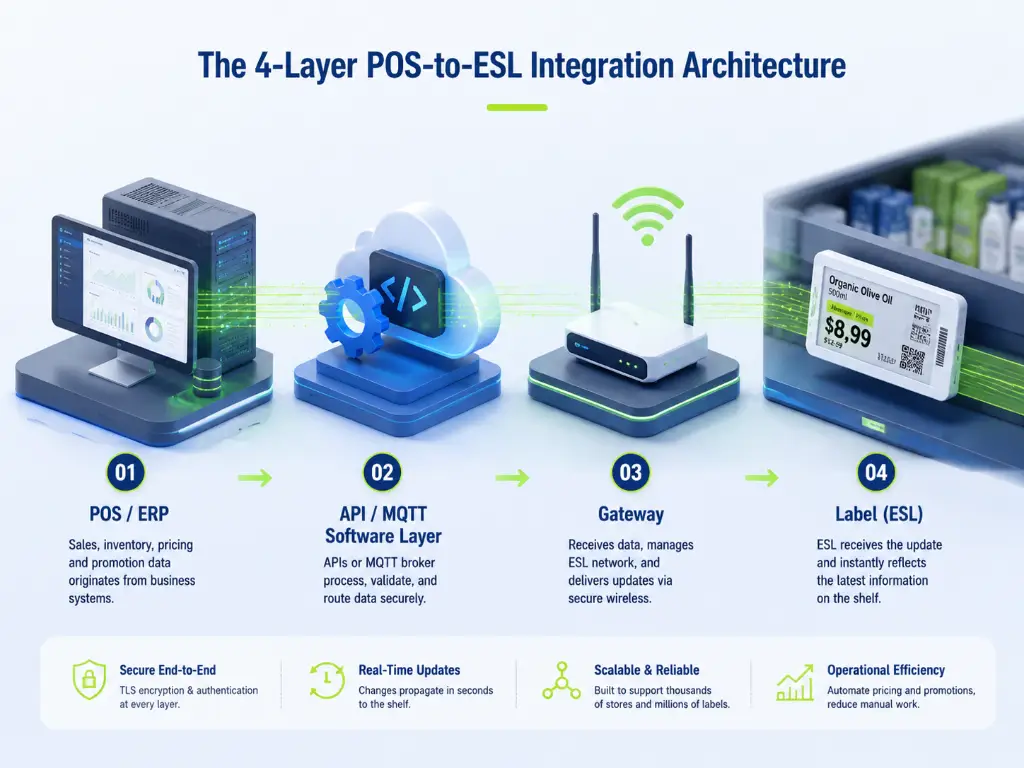
A smaller number of vendors also expose a Hardware API — a lower-level interface that lets your own application send commands directly to the ESL gateway, bypassing the vendor’s management software entirely. This approach cuts end-to-end latency to as little as 50 to 100 milliseconds per tag by removing an intermediate processing layer. It also gives you full control over data formatting, error handling, and the user interface. The trade-off is development complexity: your team needs to manage gateway communication, label addressing, and status tracking — responsibilities that the Software API layer handles for you out of the box.
A pragmatic rule of thumb: if your team has experienced developers and a clear vision for a custom retail management console, the Hardware API route offers maximum flexibility. If you need to get 500 stores live in six months with minimal custom development, the Software API with database synchronization covers 90% of real-world requirements.
Regardless of which tier you choose, roughly 70% of the integration effort goes into data mapping — translating your POS product catalog fields (SKU codes, price tiers, promotion rules, variant hierarchies) into the ESL template’s display fields. The API call itself is the easy part. The data transformation layer is where most projects stall.
70% of integration effort goes into data mapping — translating POS product fields into ESL template fields. The API call is the easy part. Plan your data mapping before you write a single line of integration code.
The Gateway Bridge: Translating Data into Wireless Signals
The gateway is the component most developers have never thought about before starting an ESL integration project. It sits between the software world of APIs and JSON payloads and the physical world of shelf labels and radio signals. Its job is threefold: protocol conversion (translating TCP/IP data into a wireless protocol the labels understand), signal routing (knowing which gateway covers which labels), and status relay (sending update confirmations and error reports back to the server).
The wireless protocol the gateway uses has direct consequences for your integration architecture. Most ESL systems operate on one of five protocols, and the choice affects everything from gateway density to update latency:
| Protocol | Range (Indoor) | Nodes per Gateway | Power Profile | Best For |
|---|---|---|---|---|
| 2.4 GHz Proprietary | 25–30 m | 500–2,000 | Low | General retail, balanced performance |
| Zigbee (Mesh) | 10–100 m per hop | Up to 65,000 (theoretical) | Very Low | Large stores, multi-floor sites |
| Bluetooth LE | 10–30 m | 50–200 | Very Low | Small-format stores, quick deployment |
| Wi-Fi | 30–50 m | 100–500 | High | Stores with existing Wi-Fi infrastructure |
| LoRa / Sub-1 GHz | 100–500 m | 1,000–5,000 | Very Low | Warehouses, outdoor retail |
From an integration perspective, the key question is not which protocol the gateway uses — it is whether the gateway’s API is open or closed. A closed gateway only accepts commands from the vendor’s own management software. An open gateway — one that supports standard protocols like MQTT or direct socket communication — allows your own application to control labels directly. This distinction becomes critical when we discuss protocol choices in the next section.
Gateway placement also matters more than most teams anticipate. A typical gateway covers a radius of roughly 25 to 50 meters in open space, but metal shelving can attenuate signals by 10 to 20 decibels, and concrete walls by 15 to 30 decibels. A large supermarket may need 10 to 20 gateways for reliable coverage. Plan your site survey before you plan your API architecture — a beautifully designed integration that cannot reach the labels on aisle 7 is not much use.
Plan your site survey before your API architecture. A beautifully designed integration that cannot reach the labels on aisle 7 is not much use.
The Label Endpoint: Display Refresh and Status Confirmation
The final hop in the data flow is the label itself. E-ink electronic paper displays use bi-stable technology — they draw power only during a screen refresh and consume zero power while displaying a static image. This gives them a battery life of three to six years under normal use (two to three updates per day), with some models rated for up to ten years.
When a label receives new data, it refreshes its display — typically within 0.5 to 1 second for a fast partial refresh or 2 to 3 seconds for a full refresh — and sends an acknowledgment signal back through the gateway to the server. This bidirectional confirmation is what turns a fire-and-forget price push into a reliable production system. Without it, your POS has no way of knowing whether the price displayed on the shelf matches the price in the database.
In a well-functioning deployment, end-to-end confirmation latency (POS sends price → label confirms display) runs between 1 and 3 seconds. Labels that fail to acknowledge — due to dead batteries, signal dead zones, or physical obstruction — should trigger an alert in the management system and generate a task for store staff to investigate. A normal deployment sees a label non-response rate below 0.5%. Signal-blind spots in the store layout can push that figure to 5% or higher, which is why gateway placement and coverage testing deserve the same engineering rigor as API design.
03 REST API vs. MQTT: Which Protocol Should Power Your Integration?
REST and MQTT are not competing standards in a winner-take-all contest. They serve different communication patterns, and the right choice depends on the characteristics of your integration scenario: how many labels you are updating, how often, and whether the communication is one-directional or bidirectional. Understanding both protocols — and knowing when each one makes sense — is what separates a three-month integration from a three-week one.
When REST API Is the Right Choice for POS-ESL Integration
REST is the default integration protocol for good reasons. Every developer knows HTTP and JSON. The tooling ecosystem — Postman, curl, Swagger, OpenAPI generators — is mature enough that you can have a proof-of-concept integration running in an afternoon. Every request is self-contained and independently debuggable: if a price update fails, you can replay the exact same POST request and inspect the response.
For smaller-scale ESL deployments, REST is entirely fit for purpose. A single-store supermarket with 3,000 to 5,000 labels updating prices once or twice a day will never hit the performance ceiling of a well-designed REST API. A batch endpoint that accepts an array of SKU-price pairs and processes them in one transaction can push 1,000 updates in three to five seconds over a local network connection. For this scale, REST’s familiarity and tooling maturity outweigh any theoretical efficiency advantage of alternative protocols.
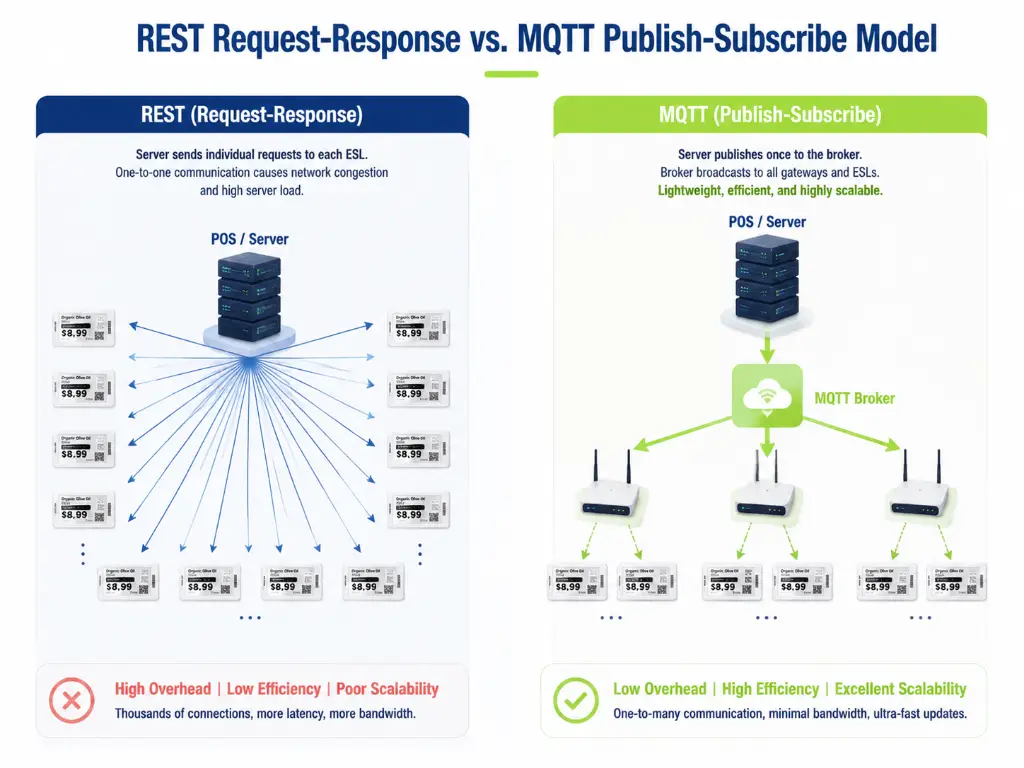
The limitations appear when scale increases. REST follows a request-response model: one HTTP request per operation. Even with batch endpoints, updating 10,000 labels means the ESL server must parse and validate a large JSON payload, then fan out individual update commands to multiple gateways — all within the scope of a single HTTP transaction. The server’s HTTP connection pool (typically capped at 500 to 2,000 concurrent connections) becomes the bottleneck. At 10,000 labels with per-label REST calls, the update takes over five minutes serially. Batching helps, but the fundamental architecture — one client pushing data to one server, one label at a time — was not designed for IoT-scale, many-to-many communication.
2-byte header (100x smaller than HTTP)
Native bidirectional — labels publish status, no polling
QoS 0/1/2 — choose your delivery guarantee
Offline queue — messages delivered on reconnect
Why MQTT Is Gaining Ground in Retail IoT
MQTT (Message Queuing Telemetry Transport) is an OASIS standard publish/subscribe messaging protocol designed specifically for constrained environments: low bandwidth, high latency, unreliable networks — exactly the conditions found in a retail store with thousands of battery-powered devices communicating over radio frequencies (OASIS, 2019).
Instead of the request-response model, MQTT uses a publish/subscribe architecture. A central message broker (such as Mosquitto or EMQX) manages topics — hierarchical address strings like store/aisle5/shelf3/labels — and routes messages from publishers to subscribers. When your POS system publishes a price change to a topic, every gateway subscribed to that topic receives the update simultaneously. The complexity is O(1) regardless of how many labels are downstream.
The advantages for ESL integration are significant and practical. MQTT’s message overhead is dramatically lower than HTTP: a minimum MQTT packet header is 2 bytes, compared to roughly 200 bytes for a minimal HTTP/1.1 request — a 100x difference that compounds across thousands of updates. MQTT is natively bidirectional, which means labels can publish their own status messages (battery level, update confirmation, error codes) to topics that your backend subscribes to, without the server needing to poll each label individually. MQTT’s Quality of Service levels give you granular control over delivery guarantees: QoS 0 for best-effort updates where occasional loss is acceptable, QoS 1 to guarantee at-least-once delivery, and QoS 2 for exactly-once delivery when duplicate price updates could cause operational problems. And MQTT handles offline clients gracefully: if a gateway temporarily loses connectivity, the broker queues messages and delivers them when the gateway reconnects — something REST simply cannot do without custom retry logic.
In practice, an MQTT-based ESL integration can achieve end-to-end latency (POS publishes → label refreshes) under 3 seconds for full refresh, with network transit under 500 ms — roughly one-fifth to one-tenth the time of an equivalent REST batch operation at scale. A single MQTT broker node can handle millions of concurrent topic subscriptions, making the architecture naturally suited to multi-store, multi-gateway deployments.
The catch is adoption. Despite being an open standard, MQTT is still absent from most ESL vendors’ product specifications. The majority of manufacturers rely on proprietary protocols or REST-only APIs. In this landscape, manufacturers that offer native MQTT support on their base stations provide a meaningful architectural advantage — particularly for deployments exceeding 5,000 labels per site or requiring real-time bidirectional communication. Zhsunyco, for example, ships ESL base stations with open MQTT protocol support built into the firmware, allowing POS and ERP systems to publish price updates directly to a standard MQTT broker without proprietary middleware. Combined with a cross-platform eRetail server that runs on .NET 10 across Windows, Linux, and macOS — including Docker container support — this architecture lets integration teams work within their existing DevOps environment rather than adapting to a vendor-imposed stack. For teams that need deeper customization, an in-house SDK and API provide direct access to label management functions, enabling custom application development without vendor lock-in at the software layer. (Learn more about Zhsunyco’s ESL integration platform)
REST vs. MQTT: A Side-by-Side Comparison for ESL Integration
For teams evaluating both protocols, the following comparison focuses on dimensions that actually matter in an ESL deployment:
| Dimension | REST API | MQTT |
|---|---|---|
| Communication Model | Request-Response (client pushes to server) | Publish-Subscribe (broker routes to all subscribers) |
| Message Overhead | ~200 bytes minimum per request (HTTP headers) | ~2 bytes minimum per message (MQTT fixed header) |
| 10,000-Label Update | 3–10 seconds (batch endpoint) to >5 minutes (per-label) | <500 ms end-to-end (single publish, simultaneous delivery) |
| Bidirectional Communication | Requires server polling or separate webhook infrastructure | Native — labels publish status to topics the server subscribes to |
| Offline Resilience | No built-in support; requires custom retry queue | QoS 1/2 queues messages for disconnected clients |
| Development Learning Curve | Low — every developer knows HTTP/JSON | Moderate — pub/sub mental model and broker management |
| Debugging | Simple — every request is self-contained and replayable | Requires broker-side logging and topic monitoring tools |
| Best ESL Integration Scenario | Single store, <5,000 labels, low-frequency updates, REST-experienced team | Multi-store, >5,000 labels, real-time bidirectional, IoT-oriented architecture |
| Standardization | De facto web standard | OASIS standard (MQTT 3.1.1 / 5.0), ISO/IEC approved |
The two protocols are not mutually exclusive. A pragmatic architecture uses REST for management operations — template design, user administration, system configuration — and MQTT for the real-time data plane where price updates and status events flow. This split gives operations teams a familiar REST interface for day-to-day management while giving the data pipeline the efficiency of pub/sub messaging for the high-volume, low-latency path.
04 Cloud vs. On-Premise ESL Server: A Deployment Decision That Shapes Everything
Where the ESL management server lives — in a cloud data center or on your own infrastructure — determines three things: who can access your pricing data, how much latency your integration incurs, and what your total cost of ownership looks like over a five-year horizon. Like the protocol decision, there is no universally correct answer, only the answer that matches your operational constraints.
Cloud ESL Servers: Speed, Convenience, and the Trade-offs
In a cloud deployment, the ESL management software runs on the vendor’s infrastructure — or a public cloud instance they manage — and your POS system communicates with it over the internet. This is the dominant model in the market for straightforward reasons: zero local server procurement, automatic software updates, and multi-store management that works out of the box because every store connects to the same central instance.
For retail chains with standard IT requirements and no regulatory constraints on data residency, cloud deployment is the fastest path to live operation. The vendor handles server maintenance, database backups, and software upgrades. Your integration team only needs to establish a secure API connection from the POS to the cloud endpoint.
The trade-offs become visible on longer time horizons. All pricing data — every SKU, every promotion, every price change — flows through a third-party server. For retailers in jurisdictions governed by GDPR, HIPAA, or equivalent data protection regulations, this may trigger compliance requirements that a cloud-only solution cannot satisfy. Internet dependency is another factor: if the store’s connection drops, cloud-based ESL updates stop until connectivity returns. Some cloud platforms offer local caching gateways that buffer updates during outages, but this adds architectural complexity to a solution chosen partly for its simplicity.
Then there is the subscription math. Cloud ESL services typically charge $10 to $30 per label per year for software and cloud access. For a 10,000-label deployment, that is $100,000 to $300,000 annually — $500,000 to $1.5 million over five years. The same deployment with a one-time software license and self-managed infrastructure might cost $30,000 to $80,000 upfront plus internal IT operations time. Whether the cloud premium is justified depends on whether your organization values operational simplicity over long-term cost optimization.
On-Premise Deployment: When Data Sovereignty Is Non-Negotiable
On-premise deployment keeps the ESL management server inside your network boundary. All pricing data stays on infrastructure you control — a hard requirement for certain industry segments and a strong preference for others.
The rigid-use-case list is short but definitive: pharmacy chains handling prescription pricing data subject to healthcare privacy regulations; government-adjacent retail operations with procurement rules that prohibit cloud-hosted data; retail groups operating in countries with strict data localization laws; and organizations with internal IT security policies that classify pricing and inventory data as sensitive intellectual property. For these buyers, on-premise capability is not a feature comparison checkbox — it is a gatekeeping requirement that immediately eliminates cloud-only vendors from consideration.
Pharmacy chains with patient pricing data (HIPAA/GDPR)
Government-adjacent retail with cloud-hosted data prohibitions
Countries with strict data localization laws
Internal IT policies that classify pricing data as IP
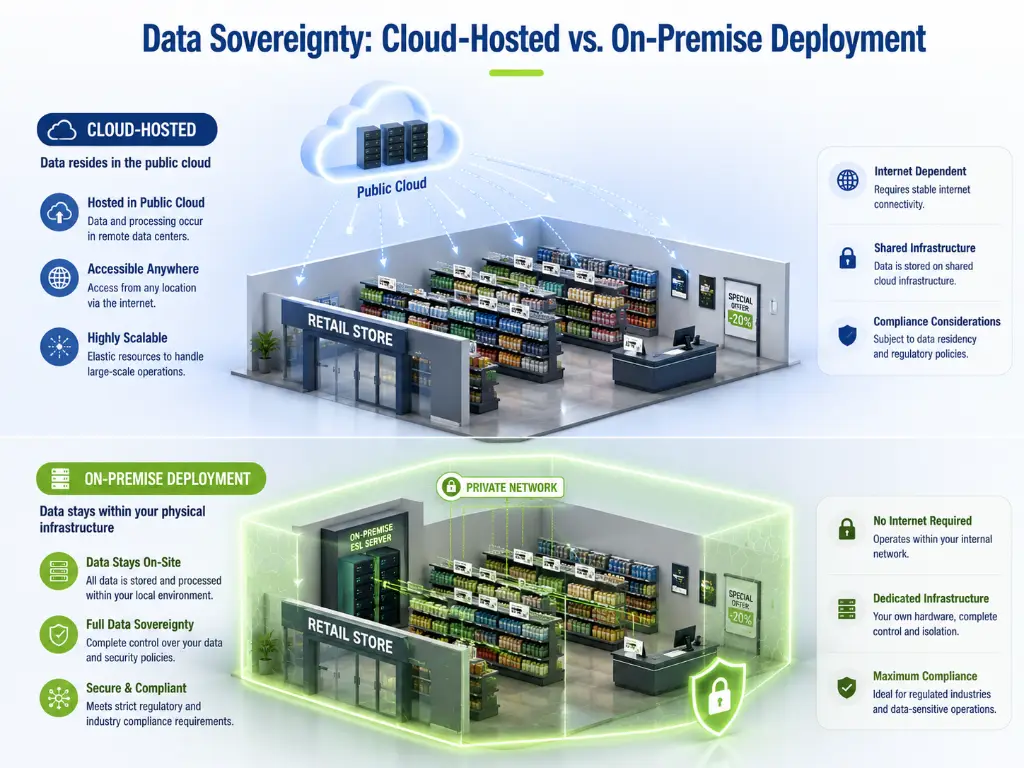
The technical requirements for on-premise ESL servers have become more manageable as the software ecosystem has matured. Modern ESL management platforms built on cross-platform frameworks like .NET 10 can be deployed on Windows Server, Linux, or macOS, with Docker container support further reducing environment-specific configuration. A typical deployment for a 50-store chain runs comfortably on a mid-range server ($3,000 to $8,000 hardware cost) with PostgreSQL or SQL Server as the database backend.
The total cost comparison favors on-premise on a three-to-five-year horizon: the one-time license fee plus hardware and IT operations time typically undercuts cloud subscription costs for deployments above roughly 3,000 labels. The trade-off is upfront capital expenditure and the need for in-house IT capability to manage the server — factors that make cloud deployment the better starting point for smaller chains or those without dedicated IT staff.
The Hybrid Model: Cloud Management + Local Execution
For retail groups that want centralized control without centralized data, a hybrid architecture splits responsibilities: the cloud handles the management plane (template design, user permissions, system health monitoring), while local gateways or edge servers handle the data plane (price updates, label communication, status tracking). Sensitive pricing data never leaves the store network; only anonymized operational metrics and configuration changes travel through the cloud.
This model is particularly well-suited to multi-country retail groups. A chain operating in France, Germany, and Poland can run local ESL servers in each country to comply with national data regulations, while brand and marketing teams at the European headquarters manage label templates and promotion schedules through a single cloud console. The architecture is more complex than either pure-cloud or pure-on-premise — it requires site-to-site VPNs or SD-WAN for the cloud-to-local management channel, and troubleshooting spans two operational domains — but for the subset of retailers with genuine multi-jurisdiction compliance requirements, the complexity is a necessary cost.
05 Scaling Across Stores: Multi-Location ESL Management via API
A single-store ESL deployment is a technology project. A 200-store rollout is an operations transformation. The API design that works for one location breaks at scale unless it accounts for organizational hierarchy, regional variation, and centralized oversight.
The core challenge is that different stores are not identical clones. A supermarket in a premium urban neighborhood runs different prices and promotions than the same chain’s location in a suburban area. Some stores use different POS systems — a legacy system in older locations, a cloud POS in newer ones. Label counts vary from 3,000 in a compact urban format to 30,000 in a hypermarket. The ESL API needs to handle this heterogeneity without forcing the integration team to build store-specific logic.
The architectural solution is a hierarchical resource model. The ESL management system organizes stores into a tree: Group → Region → Store → Aisle/Section → Label. Every API call carries a scope identifier — usually a store ID or group ID — that ensures price updates route to the correct physical labels. A well-designed API also supports bulk operations scoped to organizational units: push a promotion template to all stores in the Northwest region with a single API call, then monitor the rollout’s progress through an aggregated status dashboard.
The operational features that separate a production-grade multi-store API from a demo are batch template push (define a price change once, apply to a store group, receive per-store confirmation), scheduled price changes (set a weekend promotion to activate Friday at 5 PM and revert Monday at 7 AM — all through API timestamps, no manual intervention), and an audit trail (every price change logged with timestamp, user, store, and label ID — retained for at least 90 days to satisfy both internal controls and regulatory requirements).
When evaluating an ESL vendor’s multi-store API capability, look for three specific signals: whether the API resource model supports nested organizational hierarchy, whether batch endpoints accept store-group-level scoping rather than requiring per-store calls, and whether the system provides an aggregated health dashboard — labels online, update success rate, average latency — across all locations as a single API query.
06 Evaluating an ESL Vendor’s API: 7 Questions Your Integration Team Should Ask
By this point, you have a framework for understanding POS-to-ESL integration architecture and the key decision points around protocol choice and deployment model. The next step is translating that understanding into a concrete vendor evaluation — and the quality of a vendor’s API is far more predictive of integration success than the specifications of their label hardware.
The following seven questions form a lightweight but rigorous evaluation framework. The first three are architectural — getting any of them wrong is expensive to fix later. The last four are operational — they determine the day-to-day experience of living with the integration.
| # | Dimension | Key Question | Why It Matters | Signal of a Strong Answer |
|---|---|---|---|---|
| 1 | API Protocol Support | Does your ESL system support both REST API and MQTT? Is MQTT native to the base station or added through middleware? | Protocol choice determines your integration architecture’s ceiling — REST works for small deployments; MQTT becomes critical above 5,000 labels | Supports REST API for management + MQTT natively on base stations for the data plane; standard MQTT broker compatibility (Mosquitto/EMQX) |
| 2 | Integration Tier Flexibility | Do you offer both Software API (managed) and Hardware API (direct gateway access)? What about zero-code options like database sync? | Different stages of your integration journey need different depth — starting simple should not lock you out of going deep later | Multi-tier: database sync for quick start → Software API for standard integration → Hardware API for full custom control |
| 3 | Deployment Model Options | Can the ESL server be deployed on-premise? What operating systems are supported? Is Docker deployment available? | Data sovereignty requirements and long-term TCO both depend on deployment flexibility | Supports Cloud, On-Premise (Windows/Linux/Docker), and Hybrid models; one-time license option available for on-premise |
| 4 | Multi-Store Management | Does the API support hierarchical resource models (Group → Region → Store)? What is the batch operation ceiling per API call? | Determines whether your 200-store rollout needs 200 separate integrations or one centralized management layer | Nested store/group hierarchy; batch operations ≥500 labels per call; aggregated health dashboard via API; audit trail with ≥90-day retention |
| 5 | SDK and Documentation Quality | Do you provide multi-language SDKs? Is API documentation publicly accessible? Is there a sandbox environment for testing? | Integration development speed and success rate directly correlate with documentation and tooling quality | SDKs in at least two of .NET/Java/Python; public API reference with endpoint descriptions and examples; sandbox environment available during evaluation |
| 6 | Bidirectional Communication | Do labels send update confirmations back through the API? Can label health status (battery, connectivity, errors) be queried programmatically? | Production-grade integration cannot rely on fire-and-forget price pushes — status feedback is what turns a demo into a reliable system | API endpoints for label health status; webhook support for push-based alerting on label failures; end-to-end update confirmation latency <3 seconds |
| 7 | Software Licensing Model | Is the software subscription-based or a one-time purchase? Are future upgrades included? What happens to your data if you switch vendors? | Licensing model determines 5-year TCO and your degree of vendor dependency | One-time purchase with lifetime free upgrades for on-premise; transparent subscription with no hidden fees for cloud; clear data export/migration path |
Ask for a sandbox environment during evaluation. A working integration that updates a single test label reveals more about real-world API quality than any specification document.
The most effective way to use this checklist is to ask for a sandbox environment during the evaluation phase and verify each dimension hands-on. Vendor claims about API capability are cheap; a working integration in a sandbox — even a minimal one that updates a single test label — reveals more about real-world API quality than any specification document.
07 From API Key to Live Sync: Your Implementation Roadmap
Understanding the architecture and making informed protocol and deployment decisions gets you to the starting line. Crossing it requires a structured implementation path that validates each layer before committing to the next. Based on integration patterns from retail technology deployments, a five-phase approach minimizes the risk of discovering a fundamental incompatibility after you have already installed hardware in 50 stores.
Phase 1: Pre-Integration Audit (Weeks 1–2). Before writing a single line of integration code, document your POS system’s API capabilities. Can it push data via webhooks, or does it only support database-level access? What does your product data model look like — are prices stored as simple key-value pairs, or does your system use complex promotion rules with start dates, end dates, and conditional logic? Identify one or two candidate ESL vendors and request sandbox access. The output of this phase is a clear specification of what data needs to flow from your POS to the ESL system and in what format.
Phase 2: Proof of Concept (Weeks 3–4). In the sandbox environment, build the minimum viable integration: modify one product price in your POS, push that change through the API or MQTT broker to the ESL server, route it through a gateway, and confirm that a single test label displays the new price and sends back an acknowledgment. This phase is not about performance — it is about verifying that the end-to-end data pipeline works with your actual POS data model, not a simplified demo.
Phase 3: Data Mapping and Template Design (Weeks 5–6). Design the ESL display templates — which POS fields map to which regions of the label screen? How are multi-language prices handled? Do promotional prices display alongside regular prices, or replace them? Define data validation rules: for example, flag any price change exceeding 30% for manual review before pushing to labels. This phase produces the mapping document that governs every subsequent integration step.
Phase 4: Pilot Deployment (Weeks 7–8). Select one to three stores for a limited deployment of 500 to 1,000 labels each. Run for two to four weeks under real operating conditions. Monitor three metrics: update success rate (target ≥99.5% before proceeding to rollout), end-to-end latency (target ≤3 seconds from POS change to label confirmation), and exception recovery time (how long from a label going offline to a staff member being notified). Store staff feedback during this phase is as valuable as system metrics — if the store manager finds the system harder to use than paper labels, the technical metrics do not matter.
Phase 5: Rollout and Optimization (Week 9 onward). Use pilot data to tune gateway placement, adjust batch sizes, and refine error-handling workflows. Roll out in batches of 10 to 20 stores per wave, monitoring key metrics after each wave before proceeding. Establish standard operating procedures for label health checks, API call volume monitoring, and an escalation path for integration failures. A typical project timeline from contract signing to full deployment across 100 stores runs three to six months, with the integration development work concentrated in the first six weeks and the remaining time spent on staged rollout and operational stabilization.
Choosing an ESL partner with an integration architecture that matches your operational reality — open protocols for flexibility, deployment options for compliance, and developer tooling for speed — can compress that timeline considerably. The difference between a three-month integration and a three-week one rarely comes down to the label hardware. It comes down to the API design. If you are evaluating ESL partners for an upcoming POS integration project, discussing your specific integration requirements with manufacturers who offer open protocols and flexible deployment models is a practical next step.
References
- OASIS. “MQTT Version 5.0 — OASIS Standard.” 2019. https://docs.oasis-open.org/mqtt/mqtt/v5.0/os/mqtt-v5.0-os.html
- Global Market Insights. “Electronic Shelf Label Market Size, Share & Trends Report, 2035.” 2025. https://www.gminsights.com/industry-analysis/electronic-shelf-label-esl-market
- Fortune Business Insights. “Electronic Shelf Label Market Size, Share, Growth — Global Report, 2034.” 2025. https://www.fortunebusinessinsights.com/electronic-shelf-labels-market-102520
- Shopify. “POS API Integrations: A Practical Guide for Unified Retail.” 2025. https://www.shopify.com/my/enterprise/blog/pos-api-integrations
- AI E Ink Smart. “How POS Systems Communicate with Electronic Shelf Labels.” 2025. https://blog.aieinksmart.com/pos-system-digital-price-tags-status-communication-guide/
- Effirox. “Unlock Seamless Retail Operations with Effirox ESL System Integration.” 2025. https://effirox.com/ja/unlock-seamless-retail-operations-with-effirox-esl-system-integration/
- Zhsunyco. “Electronic Shelf Label Solutions.” https://www.zhsunyco.com/esl/
- Zhsunyco. “Customization Services.” https://www.zhsunyco.com/customization/
- Zhsunyco. “Contact Us.” https://www.zhsunyco.com/contact-us/
Zhsunyco’s open MQTT base stations and cross-platform eRetail server give your integration team direct API access. One-time software license, lifetime free upgrades, optional on-premise deployment.

 English
  Russian
  Spanish
  German
  Arabic
  French
  Bulgarian
  Polish
  Romanian
  Turkish
  Portuguese