


Grocery Store Price Tags: A Guide to Digital Costs, ROI, and Smart Vendor Selection
Digital Price Tags Grocery Stores Are Adopting — and Why
If you’ve walked into a Walmart, Kroger, or Whole Foods recently, you may have noticed something different about grocery store price tags. The familiar paper tags — the ones an employee spent hours swapping out by hand — are disappearing. In their place: slim, e-ink screens that update automatically, in minutes, from a central system.

This isn’t a pilot program. Walmart has already deployed electronic shelf labels in 2,300 stores and plans to have them in every U.S. location by the end of 2026. Kroger has rolled out the technology to roughly one in four of its 2,700 stores, with all 115 Columbus-division locations slated for completion by the end of 2027. Across the Atlantic, Tesco is preparing to bring digital tags to around 3,000 UK stores. The global electronic shelf label market is projected to grow from $1.85 billion in 2024 to $7.54 billion by 2033.
Here’s the number that matters most for independent grocers: while roughly 80% of European supermarkets already use digital price tags, U.S. grocery adoption sits at just 5–10%. That gap isn’t a sign that the technology doesn’t work — it’s a sign that American grocers are currently moving through the same adoption curve Europe went through five years ago. The question for independent operators isn’t whether to make the switch, but how to do it without the procurement team and IT budget of a national chain.
The answer starts with understanding what digital price tags actually do for a store’s operations — not in theory, but in the daily realities of labor, pricing errors, and fresh department shrink. That’s where the real case for adoption lives.
How Digital Price Tags Create Value for Grocery Operations
Modern grocery store price labels — including digital price tags, also called electronic shelf labels or ESLs — aren’t just tools that display prices. The technology solves three of the most expensive operational problems in grocery: labor waste from manual price changes, pricing errors at the shelf, and food spoilage from slow markdowns. Each of these problems costs money every week. Digital tags address all three simultaneously.
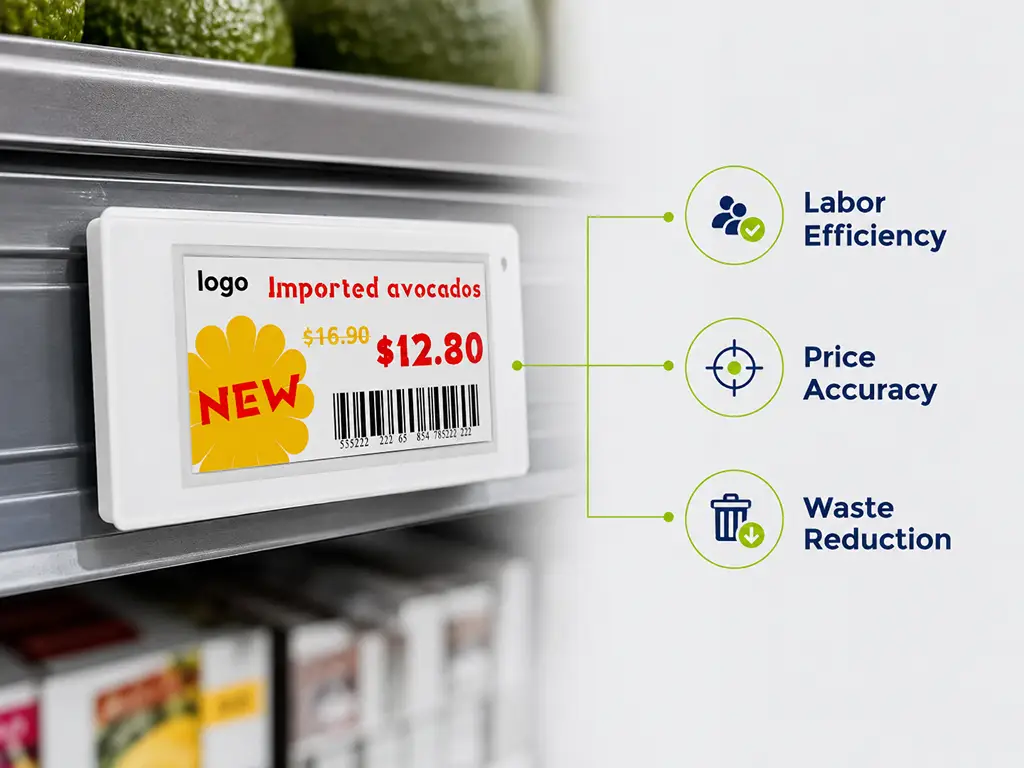
Labor Efficiency and the Real Cost of Paper Tag Changes
A typical mid-size grocery store replaces more than 7,000 paper price tags every week. That process — printing, sorting, walking the floor, pulling old tags, inserting new ones — consumes roughly two full workdays of staff time. Walmart reported that after deploying digital tags, pricing-related labor dropped by 75%. In the UK, one pharmacy documented saving 10 hours per week on tag maintenance alone.
With digital tags, price changes that took two days happen in minutes. An employee updates prices in the management software, and every tag on the sales floor refreshes automatically — no ladders, no paper jams, no missed shelves.
There’s a second-order benefit that rarely makes the headlines. FMI, the Food Industry Association, reports that its member grocers have seen employee retention improve after switching to digital shelf labels. The reason is straightforward: removing the repetitive, physically demanding work of paper tag maintenance frees associates to spend more time on customer service, merchandising, and fresh department execution — work that relies on human judgment and feels more rewarding than swapping thousands of paper slips. In an industry with roughly 200,000 open positions across the United States, retention is not a side benefit — it’s a strategic necessity.
Pricing Accuracy and Shelf-to-Checkout Consistency
Every grocer knows the scenario: a customer reaches the register and says, “The shelf said $3.49, not $3.99.” In a paper-based system, shelf-to-checkout price mismatches are inevitable — manual tag changes create a window where the shelf and the POS system disagree.
Digital shelf labels pull prices from the same database that feeds the point-of-sale system. When the price updates in the backend, the shelf and the register change simultaneously. A 2025 study by researchers at UC San Diego, UT Austin, and Northwestern University analyzed nearly 400 million transactions across 200,000 products in 114 stores over five years. They found that temporary price deviations affected just 0.005% of products per day before digital label adoption — and the change after adoption was statistically negligible at plus 0.0006 percentage points. In other words, the accuracy is already high, and digital tags make it higher.
There’s a compliance dimension here too. For grocers participating in SNAP and WIC, digital tags can automatically display program eligibility indicators tied to the product database — eliminating the risk of a manual label mismatch triggering a compliance issue.
Food Waste Reduction Through Smarter Markdowns
The profit impact of digital price tags is clearest in the fresh department. Under a paper system, marking down items approaching their sell-by date requires staff to walk the floor, identify short-dated products, print new labels, and manually swap them — a process slow enough that much of the food expires before the discount ever reaches the shelf.
Digital tags change this equation entirely. A store can program automatic markdowns: 20% off 24 hours before expiration, 40% off 12 hours before. No staff intervention required. Research indicates that this approach can reduce food waste by up to 21%. In an industry where U.S. retailers collectively lose over $100 billion annually to shrink, the margin impact of faster, smarter markdowns is material — especially for independent grocers who can’t spread the loss across hundreds of locations.
McKinsey has identified markdown responsiveness as a critical anti-shrink lever. Digital shelf labels turn a manual, once-daily process into an automated, continuous one. Your dairy case at 8 a.m. can have different prices than your dairy case at 3 p.m. — and no employee touched a single tag.

Digital vs. Paper Price Tags: Real Cost Comparison and ROI Framework
Let’s address the question every grocer asks first: what does this actually cost, and how long until it pays for itself?
Unlike traditional retail store price labels, digital price tags are not just an expense — they’re an investment with a measurable payback period. But the key to an honest ROI calculation is recognizing that the sticker price of the hardware is only one part of the equation. The real costs — and the real savings — live in places most stores don’t currently measure.
Breaking Down the Real Costs: Hardware, Software, and Hidden Expenses
The upfront investment breaks into three layers. First, hardware: individual e-ink tags cost between $5 and $20 each depending on size and features. For a small store with roughly 2,000 SKUs, that puts the hardware investment in the range of $15,000 to $40,000. A full-scale supermarket with 10,000-plus SKUs should expect $80,000 to $200,000 or more. Base stations — the wireless access points that communicate with the tags — and mounting hardware (rails, clips, hooks for different shelf types) add to this figure.
Second, software and integration: most ESL systems charge per-store or per-label licensing fees for the management platform, plus integration costs to connect with your POS, ERP, and inventory systems.
Third, the hidden costs that vendors’ first quotes rarely include: in-store network upgrades (Ethernet runs, Wi-Fi segmentation for tag traffic), staff training, and — critically — battery replacement. Most ESL tags use batteries rated for five to ten years at ambient temperature, but in cold chain environments like dairy and frozen cases, actual battery life can degrade by 20–30% from the rated figure. If a vendor can only show you laboratory data, not field data from cold-chain deployments, that’s a red flag.
Most independent grocers have never tracked how many hours their team spends swapping price tags. That’s not a criticism — it’s simply not a metric anyone thought to measure. But without that baseline, any ROI calculation is built on guesswork rather than your actual numbers. Even a rough two-week time study makes the difference between a credible business case and a wishful one.
Calculating Your Payback Period: An ROI Framework for Different Store Sizes
The ROI formula has three primary inputs on the savings side:
- Annual labor savings = weekly hours spent on tag changes × hourly wage × 52 weeks
- Price error reduction = estimated errors per week × average customer refund per error × 52 weeks
- Food waste reduction = annual shrink dollars in fresh/perishable categories × estimated reduction percentage (use 10–15% as a conservative starting point)
Divide the total investment by annual savings, and most grocers land in the 12-to-24-month payback range. Stores with high promotion frequency and fast SKU turnover — grocery, certainly — often see payback within 12 months.
A critical variable that most vendor pitches won’t emphasize: the depth of your deployment drives the speed of your ROI. A store that uses digital tags only for basic price updates will see a slower payback. A store that layers on automated fresh markdowns, promotional execution, and pick-to-light for online order fulfillment can see a return two to three times faster. The technology’s payback scales with how many of its capabilities you actually use.
For a rough self-assessment, start with three questions: How many hours does your team spend on price changes each week? How many customer complaints about price mismatches did you handle last year? How much perishable product did you throw out last month? The answers don’t need to be exact — but they’ll tell you whether your payback window is closer to one year or three.
Understanding ESL Technology: Protocols, Hardware, and Integration Basics
You don’t need to become an RF engineer to buy digital price tags. But you do need to understand enough about the technology to ask vendors the right questions — and to recognize when an answer doesn’t add up.
At its core, an ESL system has three components: the tags on the shelves, the base stations that communicate with them, and the software that manages pricing data. The main variable is the wireless protocol — the “language” the base stations and tags use to talk to each other. Different protocols suit different store layouts.
| Protocol | Range | Penetration | Power | Best For |
|---|---|---|---|---|
| 2.4GHz | ~30m | Moderate | Low | Standard single-level supermarkets |
| 433MHz | ~100m+ | Strong (through walls/floors) | Very low | Multi-level stores, warehouse formats |
| BLE (Bluetooth) | ~10m | Limited | Very low | Small independent stores, phone-managed |
| NFC | ~5cm (touch) | N/A | None (passive) | Product interaction, not bulk pricing |
| Wi-Fi | Medium-long | Moderate | Higher | LCD displays, not mass tag deployment |
The choice of protocol should follow your store’s physical layout, not a vendor’s default preference. A single-level, rectangular supermarket with clear sight lines is well-served by 2.4GHz — it’s the most cost-effective option for standard footprints. A multi-story building or a store with thick interior walls benefits from 433MHz, which penetrates obstacles more reliably. A small independent grocer with one or two locations may find Bluetooth-based systems appealing because they can be managed from a smartphone without dedicated base station hardware.
When you’re speaking with vendors, ask: “Why are you recommending this protocol for my store layout specifically?” If the answer doesn’t reference your floor plan, your shelf materials, or your department configuration — keep asking.
On the integration side, confirm that the system offers open APIs (RESTful or MQTT-based) and has a demonstrated history of connecting to your POS platform — whether that’s NCR, Lokal, LS Retail, or another system. A closed system that only works with the vendor’s proprietary software stack creates the kind of lock-in that becomes expensive to escape.
From Pilot to Full Rollout: A Deployment Roadmap for Grocers
The most common mistake first-time ESL buyers make is trying to tag the entire store at once. A phased approach reduces risk, makes the learning curve manageable, and generates early wins that build team buy-in.
Phase 0 — Preparation (4–6 weeks). Form a small project team: at minimum, one person from operations, one from IT (even if that’s your POS support contractor), and one who controls the budget. Define your success metrics before you buy a single tag. Recommended: weekly hours saved on price changes, shelf-to-checkout accuracy rate, and fresh department shrink percentage. Inventory every SKU and its shelf location — you’ll need this data for tag sizing and mounting hardware selection.
Phase 1 — Pilot (8–12 weeks). Start with one department where price changes are most frequent. For most grocery stores, that’s dairy, meat, or produce — the sections where promotions and freshness-based markdowns drive the highest volume of tag changes. Install the base stations, mount tags on 500–1,000 SKUs, and run a dual-track validation period: keep paper tags in place alongside digital tags for two to four weeks. This lets you verify that every price is displaying correctly before you pull the paper.
Phase 2 — Evaluation (4 weeks). Compare your pilot data against the baselines you set in Phase 0. Pay particular attention to RF dead zones — shelves where tags aren’t updating reliably — and staff feedback on the new workflow. The evaluation phase also surfaces the training gaps that will matter during rollout.
Phase 3 — Rollout (12–24 weeks). Expand department by department, starting with the highest-ROI sections: fresh first, then center-store grocery, and seasonal or promotional end caps last. Each department should be fully validated before moving to the next. For a single independent store, the full deployment cycle from preparation to completion typically spans six to ten months.
A single-location grocer doesn’t need to tag 10,000 SKUs on day one. Starting with 500–1,000 tags in a high-frequency department generates real operational data — and real savings — that inform whether and how to expand.
How to Evaluate ESL Vendors: A Neutral Selection Framework
Choosing an ESL provider is not like choosing a paper tag supplier. The vendor you select becomes your technology partner for the next five to ten years — the expected lifespan of the hardware. Your evaluation should prioritize long-term infrastructure fit over short-term price comparisons.
Integration Capability and API Openness
The single biggest reason ESL deployments stumble is not faulty hardware — it’s integration failure. If the tags can’t talk to your POS, your inventory system, and your pricing database, they’re just expensive plastic on shelves.
Ask every vendor these four questions: (1) Do you provide a documented RESTful API or MQTT interface — not a proprietary connector that only your team can configure? (2) Can you name three POS platforms you’ve successfully integrated with, with references? (3) Is your API documentation publicly available, or does it require an NDA just to read? (4) Can a third-party systems integrator connect to your platform, or does every change require the vendor’s professional services team?
There’s a strategic decision hiding in these questions that most first-time buyers miss. You need to decide whether you’re deploying for price accuracy — a one-way data flow from POS to shelf, updating on a daily or weekly cadence — or for pricing infrastructure — a bidirectional system that can eventually ingest competitive pricing data, demand signals, and inventory velocity to drive real-time price optimization. The architecture required for each is fundamentally different, and upgrading from the first to the second later is expensive. If you think you might want AI-driven pricing within the next five years, build for it now.
Hardware Quality, Battery Life, and Environmental Durability
The tags sit on your shelves, in your customers’ line of sight, every day. Their quality reflects on your store.
Evaluate across four dimensions. Display: E-ink screens offer wide viewing angles and remain readable under strong retail lighting without consuming power between updates — this is the standard for mass ESL deployment. LCD displays suit promotional end caps where color and motion add value, but their higher power draw and cost make them impractical for store-wide use. Battery: Request field test data from cold-chain deployments, not just laboratory ambient-temperature ratings. Dairy and frozen cases reduce real-world battery life by roughly 20–30% from rated figures. Durability: Confirm IP ratings appropriate for your environment — IP65 or higher for areas exposed to moisture and dust. Mounting: Verify the vendor can supply hardware compatible with every shelf type in your store, from gondola rails to wire baskets to freezer cases. If they can’t show you a mounting solution for a specific shelf, that shelf will stay paper.
Vendor Stability, Support SLAs, and Global Service Coverage
An ESL deployment is a five-to-ten-year commitment. The vendor’s longevity matters more than any single feature on their spec sheet. In 2018, one of Europe’s largest independent ESL providers was acquired — and some of its retail customers faced product line terminations that forced unplanned migrations. Vendor stability is risk management, not due diligence theater.
Evaluate three dimensions. Company fundamentals: years in business, R&D investment (patent count is a reasonable proxy), financial health, and total global deployments. Service-level agreements: what system uptime does the SLA guarantee? What’s the response time for a tag that stops updating? Is the replacement policy “repair and return” or “replace with new” — the latter meaning dramatically less operational disruption? Local support: does the vendor have support staff or partner technicians in your region, or is every issue handled remotely across time zones? Where is the nearest spare parts inventory?
Total Cost Transparency and Avoiding Vendor Lock-In
This is where the buying decision gets real. The price per tag that appeared in the vendor’s first proposal is not your total cost. Request a five-year total cost of ownership model that includes: hardware (tags, base stations, mounting accessories), software licensing (annual per-store or per-tag fees), network infrastructure (any required upgrades or additions), battery replacement (typically needed in years five through seven for ambient tags, earlier for cold chain), staff training, and ongoing support and maintenance fees. If a vendor is reluctant to provide this — or if the five-year number looks suspiciously close to the year-one number — treat that as a signal.
The second issue is vendor lock-in. Insist on open APIs and confirm, in writing, that you can purchase compatible tags from other suppliers in the future without replacing the entire system. Ask about minimum order quantities — some vendors have enterprise-scale MOQs that make reordering impractical for a single-location grocer. And evaluate the vendor’s customization capability: can they produce tags in custom sizes, colors, or with your branding? Can their firmware be adapted to your specific workflow? The answers to these questions determine whether you’re buying a product or entering a partnership.
When evaluating long-term flexibility, look for providers who combine open API architecture with deep OEM/ODM customization — custom label sizes, housing colors, branded packaging, and firmware-level adaptation — backed by a replacement-only hardware warranty and lifetime software updates. Some manufacturers, including ZhSunyco, also offer free test software so you can evaluate system compatibility before committing to a purchase. These capabilities matter especially for independent grocers who need a solution sized to their operation, not an enterprise package loaded with features they’ll never use.
Addressing the Elephant in the Room: Dynamic Pricing, Staff Impact, and Data Security
Before making a purchase decision, every grocer needs to address the three concerns that dominate the conversation around digital price tags — from customers, from employees, and from the broader public debate.
Dynamic pricing. The fear is real and the political attention is significant: Senators Elizabeth Warren, Bob Casey, and others have introduced legislation seeking to ban digital shelf labels in supermarkets over 10,000 square feet. But the data tells a different story. The UCSD/UT Austin/Northwestern study analyzed 400 million transactions across five years and found that temporary price surges affected just 0.005% of products before digital label adoption — and the figure barely moved afterward, rising by a statistically insignificant 0.0006 percentage points. The researchers concluded that “targeting digital shelf labels as a source of price gouging has no basis in reality.” Moreover, 92% of all price updates occur between 2 a.m. and 5 a.m., when stores are closed. Walmart, Kroger, and Whole Foods have each publicly stated they do not use and will not adopt surge pricing.
Staff impact. The UFCW union’s concerns about job displacement deserve to be taken seriously. But the operational data from grocers who have made the switch paints a different picture than “technology replaces workers.” FMI members report that eliminating repetitive paper tag maintenance has improved employee retention — associates spend their shifts helping customers and managing fresh departments rather than pulling and inserting thousands of paper slips. In an industry struggling to fill 200,000 open positions, technology that makes store-level jobs more rewarding is an asset, not a threat.
Data security. Digital shelf labels operate on closed, dedicated networks. They do not collect customer information or use cameras or microphones. Industry-standard deployments use per-tag encryption keys and AES-encrypted communication between base stations and tags. When evaluating vendors, ask for their encryption standard and most recent third-party security audit — but understand that the security profile of an ESL system is closer to a smart thermostat than a surveillance device.
These concerns are legitimate, and they deserve straightforward answers. The available evidence from actual deployments — as opposed to hypothetical scenarios — suggests each of them has been overstated.
References
- Sanders, R., Stamatopoulos, I., & Bray, R. “Electronic Shelf Labels Have Not Led to Surge Pricing in U.S. Grocery Retail.” SSRN Working Paper, 2025.
- UC San Diego Today. “New Research Debunks Fears of Supermarket Surge Pricing with Electronic Shelf Labels.” 2025.
- FMI — The Food Industry Association. “Setting the Record Straight on Digital Shelf Labels.” April 2026.
- FMI — The Food Industry Association. “The Grocery Shelf Is Ready for Its Digital Upgrade.” May 2026.
- CNBC. “Walmart digital price labels are coming to every store shelf in U.S. by end of 2026.” March 2026.
- CNBC. “How digital price tags could change the future of grocery shopping.” October 2025.
- IGA Insights. “How Electronic Shelf Labels Are Transforming Independent Grocery.”
- ZhSunyco. Official Website.
- ZhSunyco. Customized Service.
- ZhSunyco. Quality Assurance.
- ZhSunyco. Supermarket Case Studies.
- ZhSunyco. Contact.

 English
  Russian
  Spanish
  German
  Arabic
  French
  Bulgarian
  Polish
  Romanian
  Turkish
  Portuguese