


What Pick-to-Light Is and How It Works
A picker walks up to a rack, and one small display on the shelf face is lit. It shows a location number and a quantity, say 3. The picker takes three units, presses the button on the display, and the light goes out. The system records the pick and moves the order along. That whole loop, repeated hundreds of times a shift, is pick-to-light in its simplest form.

The idea is to replace searching with seeing. On a paper pick list, a person reads a line, scans bin labels, and double-checks the description before touching anything. A lit display removes the reading and the hunting. The picker’s eyes go straight to the light, the quantity is shown next to it, and the button press doubles as the confirmation.
Three pieces make up a working system. Light displays sit at each storage location. A controller network wires or links those displays together. Host software, usually your WMS or ERP, decides which lights turn on and in what order, and books the inventory once a pick is confirmed.
A full cycle looks like this. The software releases a task, and the display lights up with a location and quantity. The picker picks, presses the button, and the light goes off. The system records the update in real time. Nobody prints a list and nothing gets keyed in by hand. The warehouse runs paperless at the pick face.
Everything else about this technology, what it costs, where it breaks, whether it suits your building, follows from one question: where do those displays physically live? That is where the next section picks up.
Where the Lights Live: Four Deployment Forms
Walk through different warehouses and you will find the same idea mounted in four different ways. The form is not a maturity ranking. It is a response to the order profile: what you pick, how fast it moves, and how often the layout changes.
Pick-Face Modules, Rail-Mounted ⭐
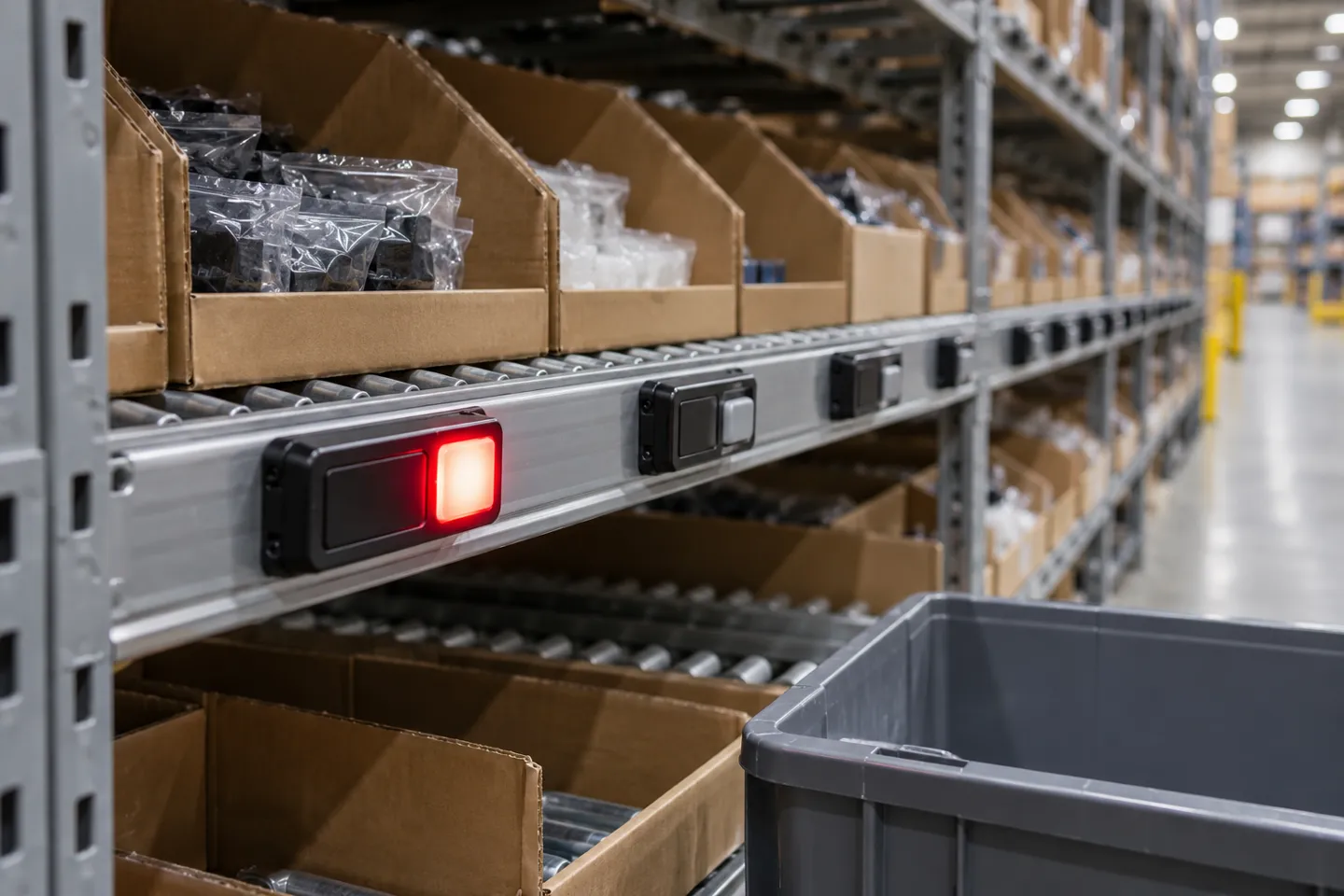
This is the classic form and the one most product pages show. A module sits at every picking location on a flow rack or shelf, usually wired back to a controller along the rail. Order after order, the system lights the exact bays in sequence, which is why this form dominates split-case and each-picking in distribution centers. The module cost only pays back where picks per hour are high. If a bay holds a slow mover that gets picked twice a week, its display is an expense that never earns its keep, so velocity analysis comes before the layout, not after.
Light-Directed Sorting Walls
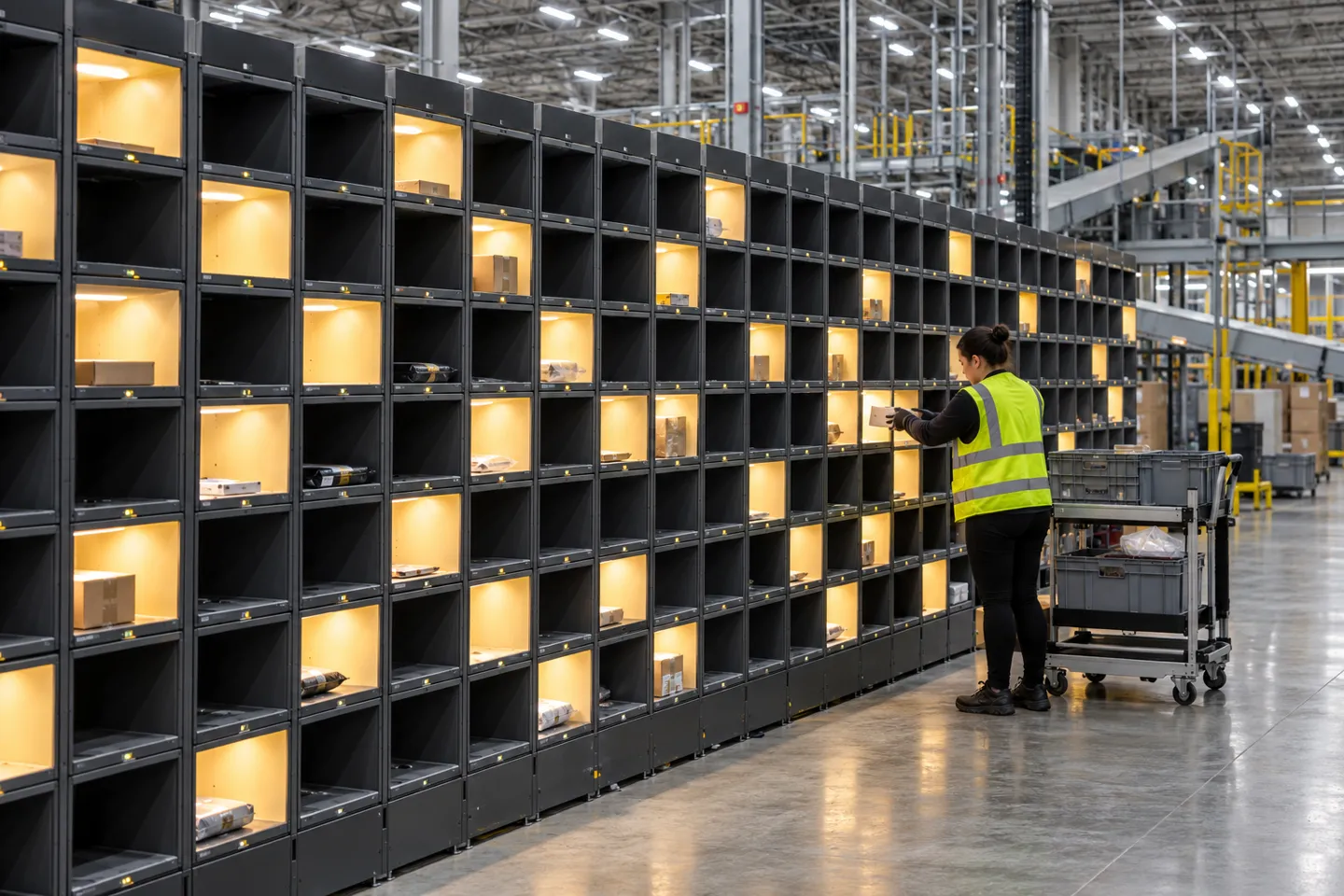
A sorting wall serves a different job: consolidating, not picking. Pickers batch-pick items by SKU across the floor, then hand them to a second team at the wall. Each scan lights the cubby that belongs to that item’s order. When an order’s cubby has everything, its light changes and the shipping label prints on the tap.
A sorting wall needs enough positions for orders in progress, space for tote changes and a clear path for items that do not fit a cubby. Size the wall using your actual order concurrency and item dimensions, then test peak waves before adding more positions.
Pick and Put Carts
Cart-mounted displays take the lights to the picker instead of fixing them to racks. One cart carries several orders in parallel, each with its own tote and light set. One operations manager at a mid-sized DC described the gain: a single picker running 8 orders at once. The setup paired carts with vertical lift modules and flow racks (r/logistics, 2023). The constraints ride on the cart: battery life, cart weight, and how many totes a person can actually push through a shift.
Wireless Modules and Display Tags
Wireless light modules and display tags can be mounted at locations without fixed rail wiring. This may simplify a pilot or a layout that changes often, but wireless coverage, refresh behavior, battery replacement and attachment method still need an on-site test. Compare the total installed and operating cost against a wired system over the same period.
Four Forms at a Glance
| Form | What it looks like | Fits best | One boundary |
|---|---|---|---|
| Pick-face modules (rail) ⭐ | A display at every location, wired along the rack | High-velocity split-case picking in stable layouts | Slow movers make the displays dead cost, run velocity analysis first |
| Sorting walls | Cubbies light up to consolidate batch-picked items into orders | Multi-SKU e-commerce parcels, small items | Cubby sizes cap item dimensions |
| Pick and put carts | Displays and totes ride with the picker | Multi-order parallel picking, medium investment | Battery, cart weight, tote count per shift |
| Wireless modules and display tags | No wiring, tags with LED indicators at locations | Leased sites, pilots, layouts that change | Refresh and battery plan must match pick frequency |
The direction worth watching: the light is migrating off dedicated rail hardware and onto general-purpose display tags. What used to be a fixed automation purchase is turning into a hardware choice. That changes who can build a system, and at what budget. The rest of this article follows that thread. Cost, failure modes, and integration all look different once the lights are no longer bolted to the rack.
When Pick-to-Light Pays Off (and When It Doesn’t)
The Order Profile That Justifies Lights
Three conditions keep showing up in operations that are happy with their systems. The work is piece picking, not case or pallet handling. A meaningful share of SKUs move fast enough that the same bays light up all day. And the motion repeats, so every second saved on search and confirm multiplies across thousands of lines.
Accuracy claims need a measured denominator. In a 71-person laboratory comparison of pick-by-paper, pick-by-light and pick-by-point, pick-by-light was fastest for picking and new-worker adaptation in that setup, while pick-by-point produced the fewest errors. Those findings do not establish a universal warehouse accuracy rate. Before buying, record lines per hour per picker and first-time-through accuracy at the audit station, then compare the same order mix during a pilot.
Pilot metrics to record
The failures cluster where the order profile does not fit. An anecdote from a logistics discussion describes both a costly rollout and a multi-order picking use case that reportedly avoided extra hiring. Treat these as questions to test, not proof of an expected return. Compare the same order mix, staffing and error checks in your own pilot.
When Alternatives Win
The decision is not really pick-to-light versus the world. Each guiding medium has a home turf, and the deployment form you picked in the last section narrows this choice further.
Boundary Matrix: Form and Fit
| Choice | Where it wins | Boundary that ends it (check this before you commit) |
|---|---|---|
| Pick-face rail lights | High-velocity split zones with stable SKUs | Low-velocity share is high: run ABC velocity analysis and count how many bays would light up less than daily |
| Sorting wall | Multi-SKU parcel orders, small items, peak compression | Measure your largest item against cubby dimensions; if it will not fit, the wall cannot take it |
| Pick carts | Multi-order picking without fixed infrastructure | Check battery runtime and loaded cart weight against your longest pick path |
| Wireless modules / display tags | Pilots, leased buildings, frequent re-slotting | Confirm operating temperature and refresh budget against your coldest zone and busiest bay |
| Voice picking | Hands-and-eyes-busy work in changing layouts | Noisy floors and heavy accents degrade recognition; pure speed on dense repetitive picks favors lights |
| RF scanning | Compliance and traceability demands, mixed task workflows | Adds a scan step, but may improve traceability and verification |
| Goods-to-person robots | Order volume high enough that walking itself is the bottleneck | Capital and lead time are in another class; lights solve picking guidance, not travel |
The sizing rule depends on order profile and item dimensions. A sorting wall is worth testing when many orders share small, frequently picked items; bulky or irregular items may be better served by a different route and handling method.
Before rolling out across a facility, pilot one lane or sorting wall. Include the normal order mix, peak periods and exception handling, then compare the results with the pre-installation baseline.

What Pick-to-Light Systems Cost
Public list prices are scarce because scope varies by site. Compare itemized project quotes against the same location count, integration work and service period.
Budget each option against the same scope: light-directed positions, controller and network hardware, mounting and wiring, WMS integration, training, spares and support. Ask for pilot and expansion costs separately.
Project quotes can differ because they include different scopes. Fixed rails bring wiring, installation and rack changes. Integrator projects add WMS interface work, commissioning, training and service. Wireless tags can reduce rewiring when a layout changes, but they add battery and refresh planning. Ask every supplier to separate hardware, installation, software, integration and support in the quote.
Two questions belong in every quote review. First, ask what the vendor is pricing against your own baseline. Lines per hour today, labor rates, and line volume give you a payback estimate you can defend to a CFO. Do not accept a payback estimate without the input assumptions. Second, ask what a confirmation means in the quoted system. If a button press is the only verification, the error cost sits quietly on your side of the table. Adding scan checks later costs more than specifying them now.
Failure Modes and the Checks That Catch Them
A light-guided system can direct a picker to the correct location while the wrong item sits in that bin. The confirmation button records that the location was visited; it does not validate the item. Test receiving, putaway and replenishment exceptions during the pilot, and decide where a barcode or weight check is needed before the error reaches the customer.
Confirmation is the second quiet risk. A button press records an action at a location; it does not independently verify the SKU or quantity. For high-value or easily confused items, evaluate a scan or weight check in the pilot and measure whether the added step improves first-time-through accuracy enough to justify its time.
Integration can determine whether the system scales beyond a demonstration. Validate the interface against the actual WMS using real item IDs, slot changes, short picks and completed-order messages. Whether the connection uses an API, MQTT or middleware, ask for the error-handling and retry behavior in writing and test it before ordering hardware for every zone.
A practical rollout starts with one lane or wall. Measure lines per hour and first-time-through accuracy against the baseline, document exceptions, then repeat the same test in the next zone. Train pickers on confirmations and recovery steps before scaling to the fastest-moving area.
Before you sign
- Inventory accuracy at the pick face is measured and trustworthy, because lights will amplify whatever they find.
- Your largest item fits the chosen form, cubby, cart or tag.
- Baseline lines per hour and first-time-through are recorded, so the pilot has something to beat.
- The WMS interface has been tested live, not promised in a datasheet.
- The pilot scope is one lane or one wall, with a date and a metric attached.
Reading This as a Business Decision
Strip the technology story down and a buying logic is left. The cost tiers argue for staged deployment. A direct-sourced sorting wall or a single lit lane proves the numbers on a five-figure budget. The pilot data then justifies each next zone. Rail-mounted modules earn their installation cost only in your fastest zone. Quoting a phased plan also changes the sales conversation, because each stage has its own success metric instead of one giant bet.
Integration decides more of the outcome than the hardware brand does. An open interface through an API or MQTT is not a nice-to-have in the quote. It is the difference between a system and a silo. Put it in the selection criteria, with a live test attached.
Error control belongs in the plan for the same reason. The cascade failure in the previous section did not come from missing lights, it came from missing checks upstream and at the confirm step. Specifying scan or weight verification for the SKUs that deserve it protects the metric that renewals are built on.
Display tags can suit zones where fixed wiring is difficult or layouts change, but their operating range, refresh rate, battery plan and mounting method must match the site. Жсуныко's industrial ESL page describes an IP-connected base-station system for warehouse labels. Confirm the exact tag model’s temperature rating, display colors, battery life and WMS interface in the current specification before using it in a cold room or busy dock. A room-temperature, low-update zone may need a simpler device.
Whatever route you take, put sample hardware in your own hands first. Compare spec sheets and lead times line by line. Run the pilot on one wall, and let your own lines-per-hour number make the argument for the next zone.
Put Sample Tags on Your Pilot Wall
Share your pick-face layout and WMS requirements to compare suitable display tags. Confirm model specifications, samples and lead times before scaling beyond the pilot.
Request Sample TagsСсылки
- Sensors. Comparative Study of Selected Order-Picking Methods: Efficiency, Ergonomics, and Adaptation Rate of New Employees.
- Logistics. Investigating the Impact of Completion Time and Perceived Workload in Pickers-to-Parts Order-Picking Technologies: Evidence from Laboratory Experiments.
- Naval Research Logistics. See the Light: Optimization of Put-to-Light Order Picking Systems.
- Reddit r/logistics. 3PL and fulfillment centers: what do you think of pick to light systems?.

 English
 Russian
 Spanish
 German
 Arabic
 French
 Bulgarian
 Polish
 Romanian
 Turkish
 Portuguese