


A picker enters a warehouse aisle without a paper list. A display at the pick face lights up, shows a quantity and waits for confirmation. After the item is taken, the picker presses the device button. The warehouse system can then receive that confirmation and release the next instruction. The shelf device communicates by radio rather than through a cable along the rack.
Wireless pick to light combines location-level visual instructions with battery-powered devices and a radio link. It can reduce the cabling required at pick faces, but it introduces radio coverage and battery maintenance into the operating plan.
The useful buying questions are operational: which locations deserve a device, how will the WMS exchange instructions and exceptions, what is the installed cost, and what does a pilot actually improve? This guide walks through those decisions and the specifications to request before committing to a rollout.

What Wireless Pick to Light Actually Is
Pick to light replaces the paper list with a device at each storage location. When a pick line is released, the device at the right location lights up and shows how many units to take. A button press confirms the pick, and the system records it in real time. “Wireless” in this phrase refers to how those devices connect and power themselves, not to home lighting; the whole category lives in warehouses, fulfillment centers, and production supply racks.
Every system, wired or wireless, runs the same loop:
Four building blocks sit behind that loop. Display tags mount at pick faces, on carts, or on put-wall slots. Routers or base stations relay commands between the software and the tags. Software turns pick lines into light commands and tracks confirmations, shortages, and battery levels. An integration layer connects all of it to the WMS or ERP through an API, a connector, or an open protocol.
Wireless devices avoid a wired bus along every shelf, which can simplify installation and later slot changes. The savings depend on the rack layout, mounting method and existing network. Each tag still needs a dependable signal, a maintained battery and a correct mapping between its device ID and the physical location. Test those conditions in the proposed zone rather than assuming that a cordless tag is automatically easier to operate.

Installation and life-cycle cost are where those differences become concrete. Compare a wired and wireless design over the same number of locations, the same WMS scope and the same service period.
What a Wireless Deployment Actually Costs
A public price per light cannot describe a complete warehouse project. Ask for itemized quotations covering the tags or light modules, base stations, mounting accessories, software, integration, commissioning, spare devices, batteries and support. Separate a one-zone pilot from a full-site expansion. This makes competing designs comparable even when their device prices differ.
| Cost component | What to include in the quote | Acceptance question |
|---|---|---|
| Devices and mounting | Tags, indicators, clips, rails and spare units | How many locations need a dedicated device? |
| Rede | Base stations, cabling, PoE and site survey | Does every pick face pass the coverage test? |
| Software and integration | License, WMS interface, testing and support | Who owns errors, retries and version changes? |
| Operations | Batteries, training, replacements and service | What is the three-year operating cost? |
Where Wireless PTL Pays Off and Where It Fails
The strongest candidates usually have repeat picks at stable, accessible locations and a clear need to guide new staff through the same workflow. The business case should be tested on the actual order mix. In a 71-person laboratory comparison, pick-by-light was fastest for order picking and new-worker adaptation among the tested methods, while pick-by-point produced the fewest errors. This is evidence for testing speed and accuracy separately, not a universal warehouse accuracy promise (Sensors study, 2025).
A pilot may fail even when every light works. Slow-moving locations can leave devices idle. Bulky items may be awkward at a small pick face. Incorrect slot data can send a worker to the wrong bin, and a button press by itself does not verify the SKU or quantity. Record these failure paths before launch and compare them with scanning, voice or another workflow when the product mix calls for it.
Put walls: the other half of the payoff
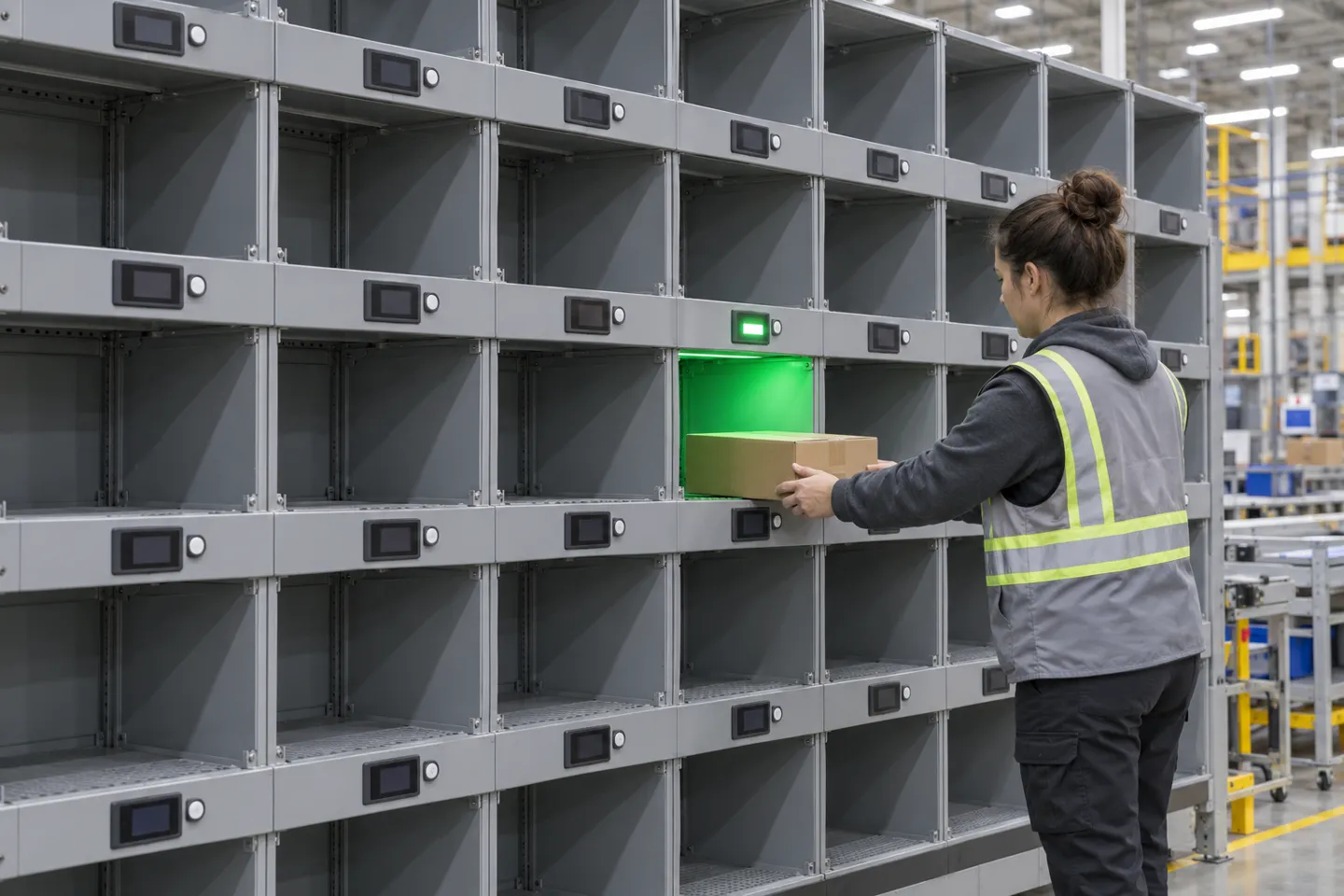
A put wall is a distinct use case. Items are batch-picked and then directed to order slots for sorting. A light at the destination can help the sorter identify the right slot, but the layout must account for active orders, tote changes and items that do not fit the cubbies. A peer-reviewed optimization study shows that put-to-light performance depends on the wall configuration, storage assignment and SKU sequence (Naval Research Logistics study, 2020). Size the wall with your order concurrency and peak waves, then test actual mis-sorts and throughput.
| Cenário | Wireless PTL fit | Typical failure mode if forced | Check first |
|---|---|---|---|
| High-frequency small-parts pick faces | Strong | None if density is right | Lines per location per day |
| Low-frequency long-tail shelving | Weak | Low use may weaken the case | Test shared indicators or skip |
| Pallet and full-case picking | Pobre | Scanning or voice fits better | Confirm pick level (each vs case) |
| Multi-line order sortation (put wall) | Strong | Slot churn if layout freezes | Daily multi-line order count |
| High turnover or seasonal staff peaks | Strong | Baseline missing for comparison | Record error rate before launch |
| Serial/lot capture required on every unit | Partial | Lights confirm location, not item | Plan a scanner at the station |
| Cold store or washdown areas | Condicional | Consumer-grade tags fail early | Demand the actual low-temp/IP spec sheet |
If the order profile supports a pilot, the next decision is technical: radio coverage, battery duty cycle and the number of devices needed at each location.
Send us your pick profile and zone count, and we will map it against these fit patterns before you budget a single device.
Map my zone fitChoosing the Radio, the Battery and the Network Design
Wireless pick to light can use different radio systems. A protocol name alone does not establish indoor range, response time or resilience among metal racks. Ask each supplier for the exact tag model, base-station model, firmware version and site-survey method. The network design must be tested at the furthest and most obstructed pick faces during a realistic peak shift.
Radio protocols compared
| Radio approach | What to verify on site | Integration question |
|---|---|---|
| Vendor-managed private radio | Coverage, device density and recovery after interruption | Which API or connector exposes pick events? |
| Wi-Fi tag | Battery use, roaming and security policy | Who manages credentials and firmware? |
| BLE or gateway design | Gateway placement, interference and latency | How are missing confirmations retried? |
| Other low-power radio | Local regulatory band, coverage and update rate | Can the WMS receive device status? |
As a concrete example, Zhsunyco’s industrial ESL specification lists a private 433 MHz/LoRa radio for one tag family, with a published 13–15 m communication distance. Its base-station page states support for up to 65,000 connected labels. These are product specifications, not a guarantee that one base station will cover a specific warehouse or sustain a particular pick rate. Ask for the tested layout, confirmation latency and capacity under your workload.
Battery life is a refresh-rate story
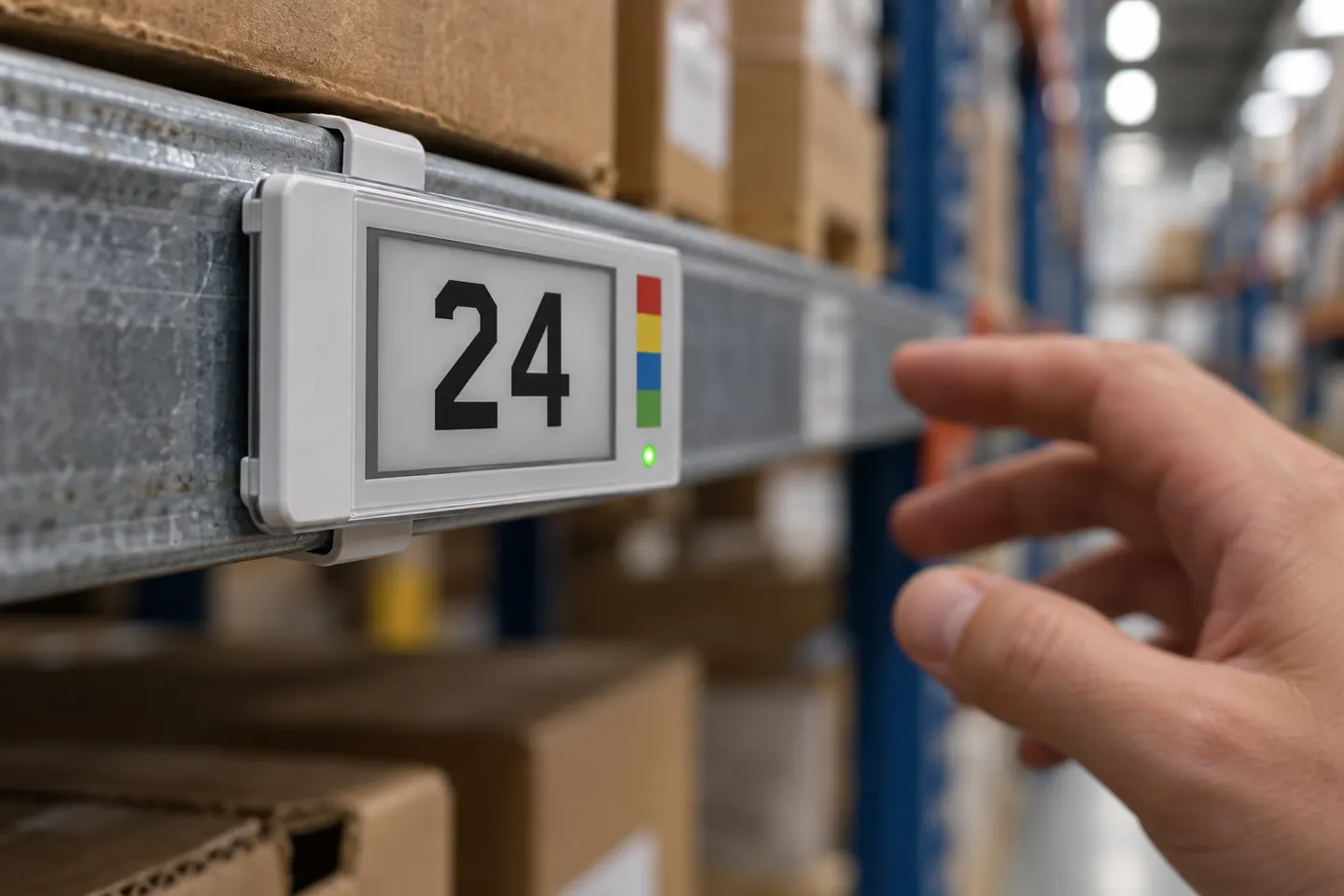
Battery life depends on the exact model, cell type, update frequency, LED use and temperature. An E-ink image remains visible between updates, but the radio and indicator still consume power when active. Zhsunyco’s published S-CT290-E specification lists two CR2450 cells and a life of at least two years for that model; it does not establish the same life in every pick-to-light duty cycle. Request the measurement conditions and test a busy location before forecasting maintenance (industrial ESL specification).
Environment ratings are model-specific. The published S-CT290-E range is 0–40 °C and 45–70% relative humidity (industrial ESL specification). That model should not be assumed suitable for a cold room or washdown area. Ask for the exact temperature, humidity and ingress-protection specifications of any alternative model, and verify the mounting method against your racks.
Sizing the network
For a 400-location pilot plan, begin with the actual pick faces rather than dividing by a generic router capacity. Count which locations require an individual quantity display and which could share a visible indicator without ambiguity. Place proposed base stations on the site plan and measure command and confirmation performance at the farthest racks. Add redundancy only after the failover behavior has been demonstrated. A published maximum number of connected labels does not establish the simultaneous pick throughput of a site.
Radio choice also affects support ownership. A private network may simplify tag management through one supplier but tie replacements to that ecosystem. A general-purpose network can shift more security and maintenance work to the buyer. Document who changes credentials, updates firmware, diagnoses missing events and owns the WMS interface before comparing quotes.
Getting It Integrated and Live
The WMS interface determines whether the display guides a live operation or only demonstrates a light turning on. The host must send a pick instruction, receive a confirmation and handle shortages, reversals and reassigned locations. Define those events with the supplier before hardware is ordered. An integration test should include duplicate messages, temporary network loss and recovery after a device is moved.
Several integration routes are possible; the right one depends on the WMS and the supplier’s supported interfaces:
Clean the location data before the first device goes up. Suppose the WMS thinks an item lives in bin B-12 while it physically sits in B-14. The light can direct a worker to the wrong location repeatedly until the data is corrected. Test the mapping between item, location and device before the pilot begins.
A practical rollout begins with one zone and a recorded baseline. Define short-pick, damaged-item and wrong-location actions before go-live. Test the WMS messages with real item IDs and location changes, then run peak-period orders through the pilot. Expand only after the same speed, accuracy and exception measures can be repeated in a second zone.
For a buyer or a channel partner, the pilot is also where supplier claims get audited against reality, and that audit is easier with a checklist than with trust.
Sourcing Wireless PTL Hardware for Resale and Deployment
A sourcing decision needs more than a market-size forecast. For a reseller or operations team, the durable questions are compatibility, repeatable supply and service. Ask whether the quoted tag model supports the required display content and indicator behavior, how the base station exposes events, and what happens when a label or battery fails. Separate the cost of the display from software and integration so a low unit price does not hide a costly deployment.
For a channel assortment, distinguish simple light indicators from E-ink displays that can show item or order details. Then confirm the interface and battery plan for each model. A rich display is useful only when its response speed and indicator behavior suit the actual picking cycle. Build the offer around tested use cases, documented interfaces and replacement parts rather than an unsupported battery-life headline.
For resellers and operations teams comparing suppliers, this checklist turns the article’s spec talk into RFQ lines:
Service is part of the hardware decision. Compare sample availability, replacement lead times, firmware support, warranty terms and the ownership of integration work. If private labeling is needed, ask which changes affect certification, minimum order quantities and lead time. Put every commitment on the RFQ rather than assuming that a catalog family shares one specification.
As one potential source, Zhsunyco publishes an industrial ESL line with a 2.9-inch black-and-white E-ink model, an optional RGB indicator and a private-radio base station. The published S-CT290-E specification lists a 13–15 m communication distance, two CR2450 cells, at least two years of battery life and a 0–40 °C operating range. The base-station description lists support for up to 65,000 connected labels. Confirm current model availability, integration documentation, update rate, sample lead time and the required environment rating in the written quotation; the website specification alone is not a project acceptance test.
For a comparable quote, send the number of pick faces, item and order profile, WMS platform, zone drawing and required exception flow. Request a sample of the exact tag and base station proposed for the project.
Send your location count, pick profile, and WMS platform. The Zhsunyco team replies with a tag, base station, and integration layout sized to your zones.
Request a spec-based quoteReferências
- Sensors. Comparative Study of Selected Order-Picking Methods: Efficiency, Ergonomics, and Adaptation Rate of New Employees. 2025.
- Logistics. Investigating the Impact of Completion Time and Perceived Workload in Pickers-to-Parts Order-Picking Technologies: Evidence from Laboratory Experiments. 2024.
- Naval Research Logistics. See the Light: Optimization of Put-to-Light Order Picking Systems. 2020.

 English
 Russian
 Spanish
 German
 Arabic
 French
 Bulgarian
 Polish
 Romanian
 Turkish
 Portuguese